Plus Two Computer Science Chapter Wise Previous Questions Chapter 6 Client-Side Scripting Using JavaScript

Kerala State Board New Syllabus Plus Two Computer Science Chapter Wise Previous Questions and Answers Chapter 6 Client-Side Scripting Using JavaScript.

Kerala Plus Two Computer Science Chapter Wise Previous Questions and Answers Chapter 6 Client-Side Scripting Using JavaScript

Question 1.
“TRUE AND FALSE are used to represent boolean values”. State if the above-given statement is correct or not. [March 2016] (1)
Answer:
Correct
Note: In the case of Javascript it is not correct.

Question 2.
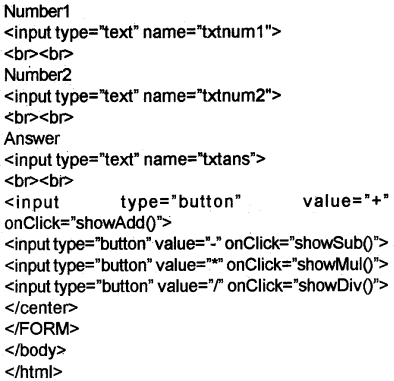
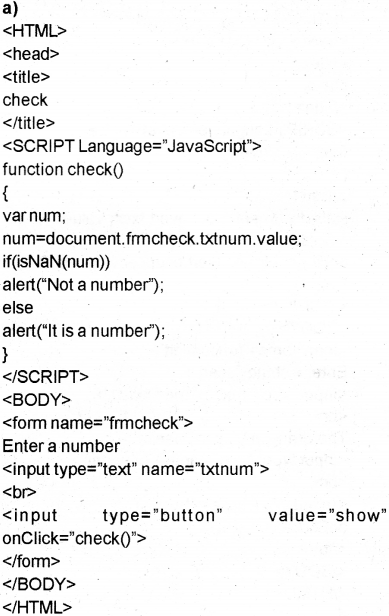
Develop a webpage that implements a JavaScript function that takes two numbers as input and displays their product. [March 2016] (2)
Answer:
Plus Two Computer Science Chapter Wise Previous Questions Chapter 6 Client-Side Scripting Using JavaScript 1
Plus Two Computer Science Chapter Wise Previous Questions Chapter 6 Client-Side Scripting Using JavaScript 2
Plus Two Computer Science Chapter Wise Previous Questions Chapter 6 Client-Side Scripting Using JavaScript 3

Question 3.
Give the function in JavaScript that converts a string type data containing numbers to number type. [March 2016] (1)
Answer:
Number ()

Question 4.
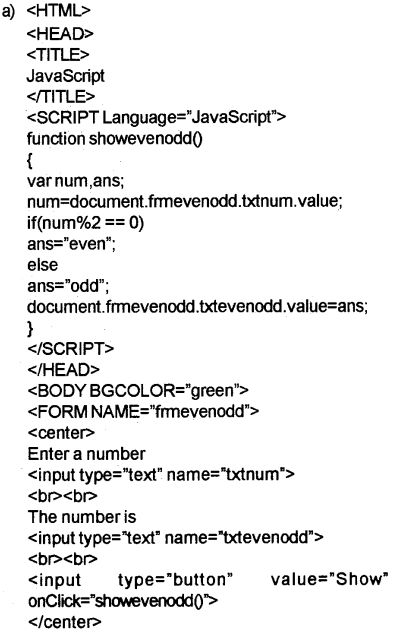
a) Design a web page with form tag which accepts a number in a textbox and another textbox that should display either odd or even. Write a function in JavaScript to check whether the number is odd or even. [March 2016] (2)
OR
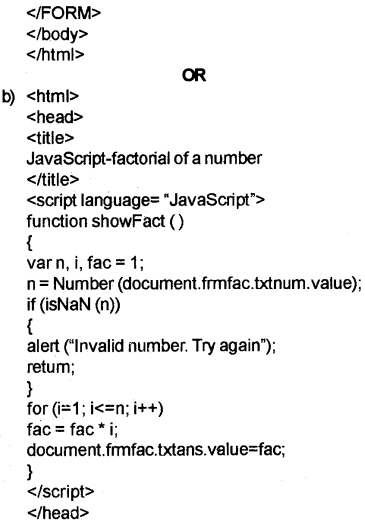
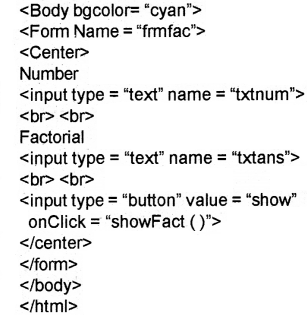
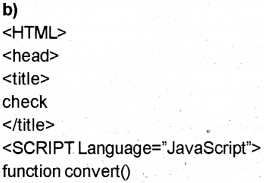
b) Develop a web page that accepts a number after validation and prints the factorial of it. (2)
Answer:
Plus Two Computer Science Chapter Wise Previous Questions Chapter 6 Client-Side Scripting Using JavaScript 4
Plus Two Computer Science Chapter Wise Previous Questions Chapter 6 Client-Side Scripting Using JavaScript 5
Plus Two Computer Science Chapter Wise Previous Questions Chapter 6 Client-Side Scripting Using JavaScript 6

Question 5.
JavaScript provides a large, number of built-in functions. [March 2016]
a) Name any two of them with an example. (2)
b) The property which returns the size of the string is ………………. (1)
Answer:
a) Refer Let us Asses Question 6
b) length property eg: x = “BVM”;
alert (x;length);

Question 6.
A virtual machine for executing JavaScript code is ______ . [March 2017] (1)
Answer:
JavaScript engine.

Question 7.
Discuss about six built-in functions used in JavaScript.
Answer:
Refer Let us Asses Question 6

Question 8.
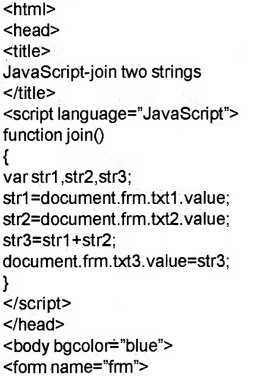
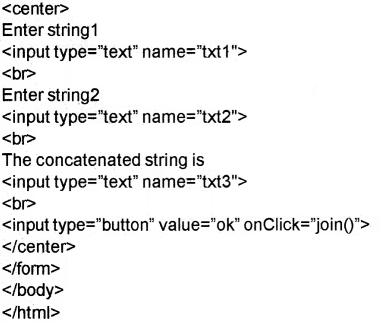
Design a procedure in JavaScript that takes two strings as input and displays the concatenated strings as output. [March 2017] (2)
Answer:
Plus Two Computer Science Chapter Wise Previous Questions Chapter 6 Client-Side Scripting Using JavaScript 7
Plus Two Computer Science Chapter Wise Previous Questions Chapter 6 Client-Side Scripting Using JavaScript 8

Question 9.
State whether the following statements are true or false: [May 2017]
a) JavaScript is the only client-side scripting language. (1)
b) JavaScript is a case sensitive scripting language. (1)
c) The keyword used to declare a variable in JavaScript is VAR. (1)
Answer:
a) false
b) false (The identifiers in JavaScript are case sensitive.)
c) true.

Question 10.
Predict the output of the following code: [May 2017]
<HTML>
<BODY>
<SCRIPT Language = “JavaScript”>
var i, s =0;
for (i=1; i<=10; i+=2)
s+=i;
document.write(“sum=”+s);
</SCRIPT>
</BODY>
</HTML> (2)
Answer:
The output is 25 (The sum of odd numbers less than 10)

Plus Two Computer Science Chapter Wise Practice Questions Chapter 6 Client-Side Scripting Using JavaScript

Question 1
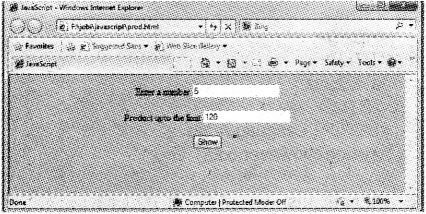
Develop a web page to display the following screen. (3 Marck)
Plus Two Computer Science Chapter Wise Previous Questions Chapter 6 Client-Side Scripting Using JavaScript 9
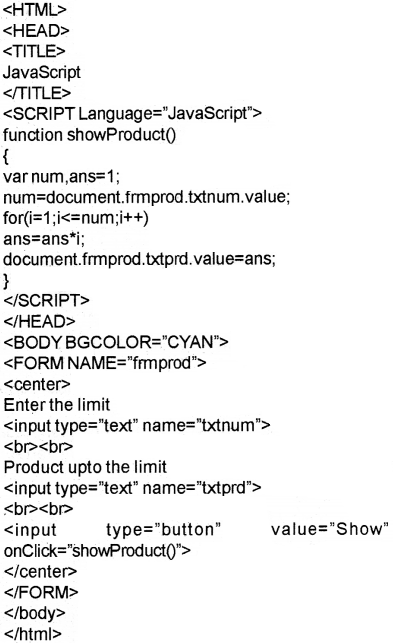
User can enter a number in the first text box. On clicking the show button, product of all numbers from 1 to the entered limit should be displayed in the second text box.
Answer:
Plus Two Computer Science Chapter Wise Previous Questions Chapter 6 Client-Side Scripting Using JavaScript 10

Question 2.
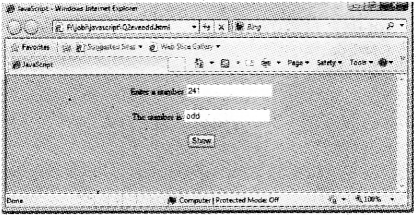
Develop a web to display the following screen (5 Mark)
Plus Two Computer Science Chapter Wise Previous Questions Chapter 6 Client-Side Scripting Using JavaScript 11
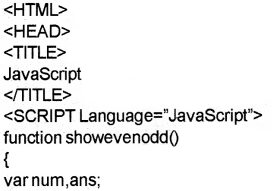
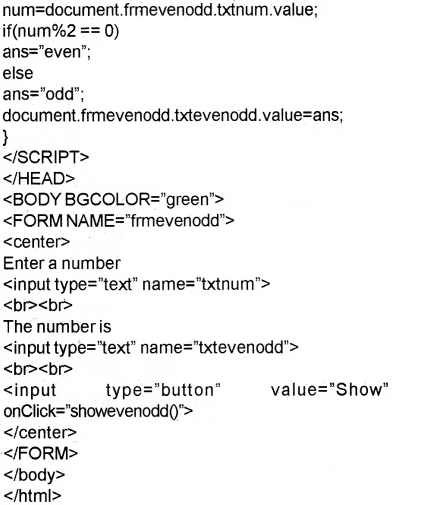
clicking the show button, Even or Odd should be displayed in the second text box depending on whether the number is even or odd.
Answer:
Plus Two Computer Science Chapter Wise Previous Questions Chapter 6 Client-Side Scripting Using JavaScript 12
Plus Two Computer Science Chapter Wise Previous Questions Chapter 6 Client-Side Scripting Using JavaScript 13

Question 3.
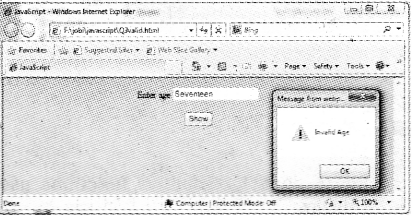
Develop a web page to display the following screen. (5 Mark)
Plus Two Computer Science Chapter Wise Previous Questions Chapter 6 Client-Side Scripting Using JavaScript 14
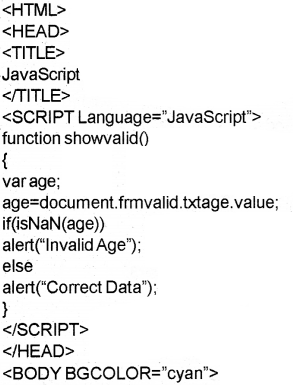
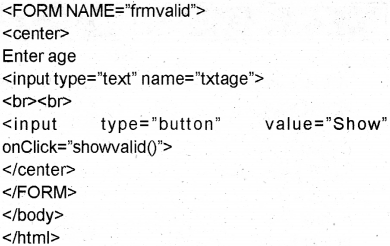
The user can enter an age in the text box. If the user enters an alphabet, instead of a number in the text box, on clicking the show button, it should display a message “Invalid Age” to the user. Otherwise it should display a message “Correct Data”.
Answer:
Plus Two Computer Science Chapter Wise Previous Questions Chapter 6 Client-Side Scripting Using JavaScript 15
Plus Two Computer Science Chapter Wise Previous Questions Chapter 6 Client-Side Scripting Using JavaScript 16

Question 4.
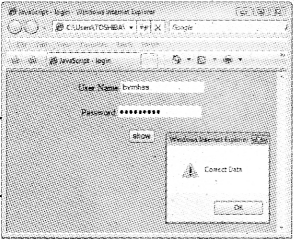
Develop a login page as shown in the following figure. (5 Mark)
Plus Two Computer Science Chapter Wise Previous Questions Chapter 6 Client-Side Scripting Using JavaScript 17
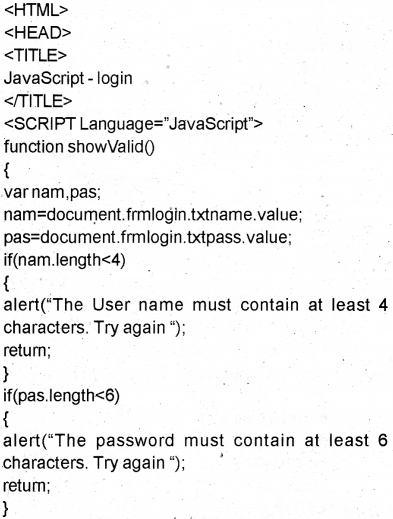
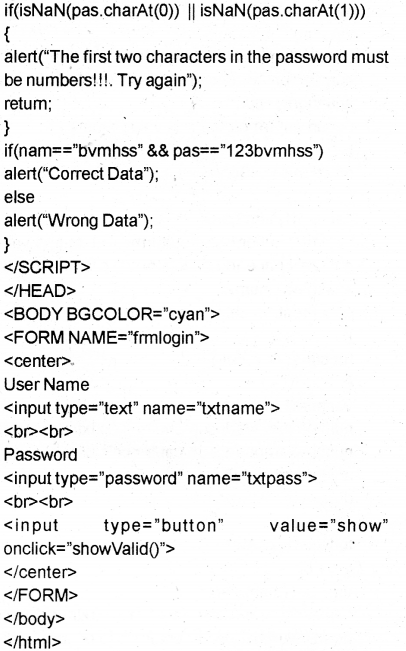
The page must contain one text box for entering the username and one password box for entering the password. The user name must contain at least 4 characters and the password must contain at least 6 characters. The first two characters in the password must be numbers. On clicking the show button, if the valid data are given in boxes, a message ‘‘Correct Data” should be displayed. Otherwise, “Wrong Data” message should be displayed.
Answer:
Plus Two Computer Science Chapter Wise Previous Questions Chapter 6 Client-Side Scripting Using JavaScript 18
Plus Two Computer Science Chapter Wise Previous Questions Chapter 6 Client-Side Scripting Using JavaScript 19

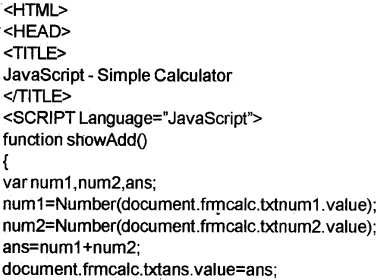
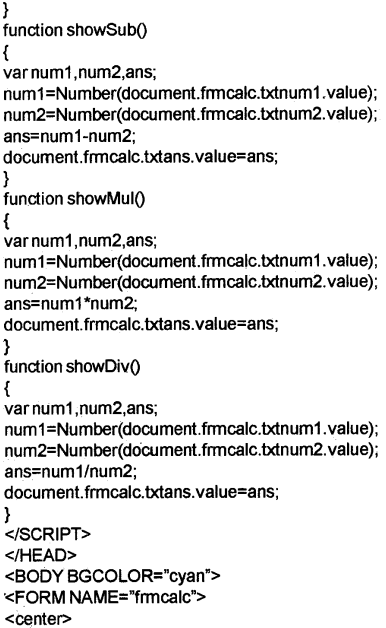
Question 5.
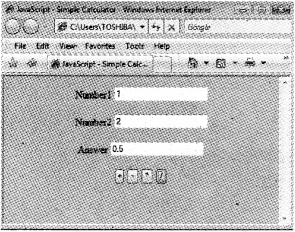
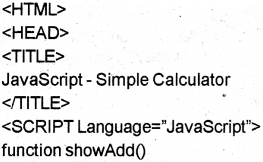
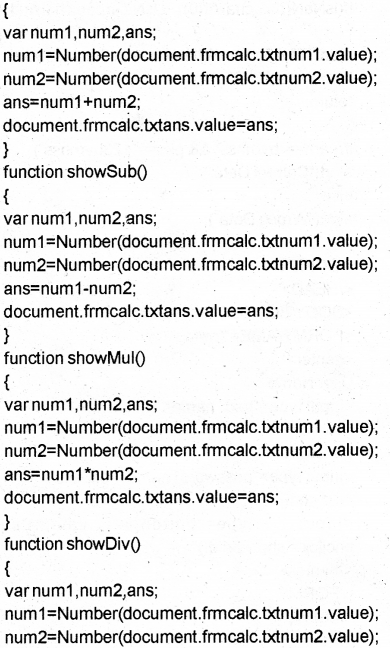
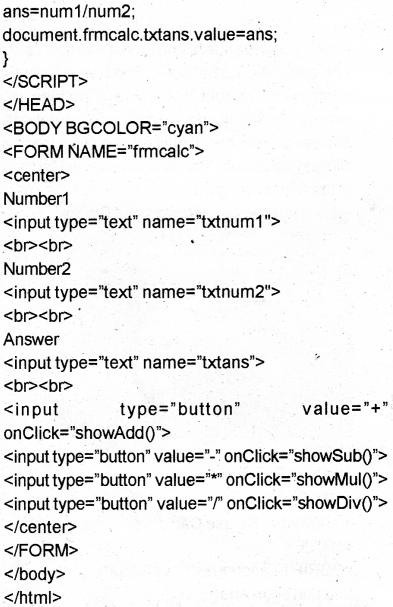
Develop a web page to implement a simple calculator. The page should have two text boxes to enter two numbers. It should also have 4 buttons to add, subtract, multiply and divide the two numbers. The answer should be displayed in a third text box on clicking the button. The web page should be as shown in the following figure. (5 Mark)
Plus Two Computer Science Chapter Wise Previous Questions Chapter 6 Client-Side Scripting Using JavaScript 20
Answer:
Plus Two Computer Science Chapter Wise Previous Questions Chapter 6 Client-Side Scripting Using JavaScript 21
Plus Two Computer Science Chapter Wise Previous Questions Chapter 6 Client-Side Scripting Using JavaScript 22
Plus Two Computer Science Chapter Wise Previous Questions Chapter 6 Client-Side Scripting Using JavaScript 23

Plus Two Computer Science Chapter Wise Assess Questions and Answers

Question 1.
Write the value of the variable z in each of the following (5 Mark)
a) var x,y,z;
x5;
y=3;
z++x—y—;
Answer:
z=6-3 = 3
Hence z = 3.

b) var xy,z;
x=”12″;
y=”13″;
z=x+y;
Answer:
z= “12” + 13 = 1213. If one of the operand is a string the two strings concatenates the strings.That is It concatenates two strings.

c) var x,y,z;
x=20;
y=8;
x %=y;
z=x++;
Answer:
x %=y means x=x%y.
that is x= 20 % 8.
i.e. x = 4.
Then z = 4. (x++ first use the value then change)

d) var x,y,z;
x=1;
y=4;
z= !(x<y);
Answer:
The answer is false.
z= !(1<4)
z = !(true)
z = false

e) var x,yz;
x=5;
y=6;
z (x>y) || (y% 2 == ());
Answer:
The answer is true.
Steps
z= (5>6) || (6%2())
= (false) || (0 == ())
= (false) || (true)
= true.

Question 2.
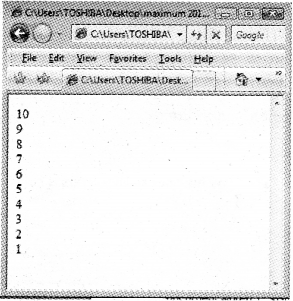
Predict the output of the following (5 Mark)
a) <HTML>
<BODY>
<SCRIPT Language’JavaScript’>
var i;
for(i=10;i>=1 ;i—)
document.write(i + “<BR>”);
</SCRIPT>
</BC DY>
</HTML>
Answer:
Plus Two Computer Science Chapter Wise Previous Questions Chapter 6 Client-Side Scripting Using JavaScript 24

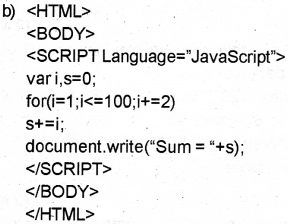
Plus Two Computer Science Chapter Wise Previous Questions Chapter 6 Client-Side Scripting Using JavaScript 25
Answer:
The output is 2500.

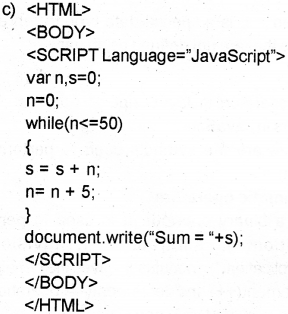
Plus Two Computer Science Chapter Wise Previous Questions Chapter 6 Client-Side Scripting Using JavaScript 26
Answer:
The output is 275.

Plus Two Computer Science Chapter Wise Previous Questions Chapter 6 Client-Side Scripting Using JavaScript 27
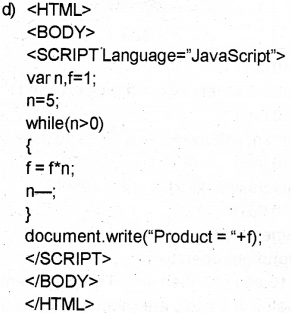
Answer:
The output is 120 (5 factorial)

Question 3
Following is an html code segment in a web page (1 Mark)
<FORM Name=”frmStud”>
<INPUT Type-‘text” Name=”studentName”>
</FORM>
Fill in the blanks to store the value of the text box to the variable n.
varn;
n= __________;
Answer:
n=document.frmstud.studentName.value;

Question 4.
Suppose you have written a JavaScript function named check Data(). You want to execute the function when the mouse pointer is just moved over the button. How will you complete the following to do the same? (1 Mark)
<INPUTType=”button” _________ = ‘‘checkData()”>
Answer:
<INPUTType-’button” onMouseEnter= “checkData()”>

Question 5.
Explain <SCRIPT> tag and its attributes. (2 Mark)
Answer:
Scripts are small programs embedded in the HTML pages, to write scripts <SCRIPT> tag is used.

* Language attribute specifies the name of the scripting language used.
*Example:
<SCRIPT Language=”JavaScript”>
___________
</SCRIPT>

Question 6.
Write the syntax of a built-in function in JavaScript. (5 Mark)
Answer:
Built in functions(methods)
1) alert()- : This is used to display a message(dialogue box) on the screen.
eg: alert(“Welcome to JS”);

2) isNaN()-: To check whether the given value is a number or not. It returns a Boolean value. If the value is not a number(NaN) then this function returns a true value otherwise it returns a false value.

Eg:
1. isNaN(“BVM”); returns true
2. isNaN(8172); returns false
3. isNaN(“680121”); returns false
4. alert(isNaN(8172); displays a message box as false

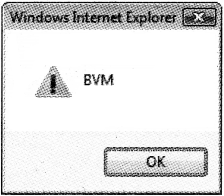
3) tollpperCase() -: This is used to convert the text to upper case.
Eg:
var x=”bvm”;
alert(x.toUpperCase());
Output is as follows
Plus Two Computer Science Chapter Wise Previous Questions Chapter 6 Client-Side Scripting Using JavaScript 28

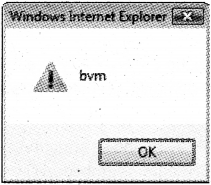
4) toLowerCase():- This is used to convert the text to lowercase.
Eg:
var x=”BVM”;
alert(x.toLowerCase());
Output is as follows
Plus Two Computer Science Chapter Wise Previous Questions Chapter 6 Client-Side Scripting Using JavaScript 29

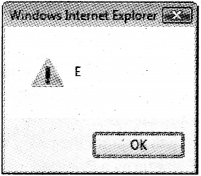
5) charAt():- It returns the character at a particular position.
Syntax: variable.charAt(index);
The index of first character is 0 and the second is 1 and so on.
Eg:
var x=”HIGHER SECONDARY”;
alert(x.charAt(4));
Output is as follows
Plus Two Computer Science Chapter Wise Previous Questions Chapter 6 Client-Side Scripting Using JavaScript 30

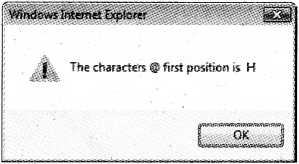
Eg.
var x=”HIGHER SECONDARY”;
alert(“The characters @ first position is “+ x.charAt(()));
Plus Two Computer Science Chapter Wise Previous Questions Chapter 6 Client-Side Scripting Using JavaScript 31

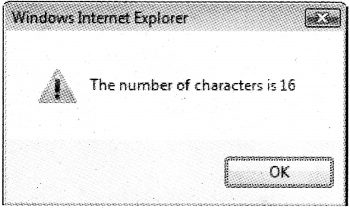
6) length property-: It returns the number of characters in a string.
Syntax: variable.length;
Eg.
var x=”HIGHER SECONDARY”;
alert(“The number of characters is “+ x.length);
Output is as follows(note that space is a character)
Plus Two Computer Science Chapter Wise Previous Questions Chapter 6 Client-Side Scripting Using JavaScript 32

Question 7.
Classify the following values in JavaScript into suitable data types. (3 Mark)
“Welcome”, “123”, “true”, 67.4, .98, false, “hello”
Answer:
Number-: 67.4 and .98 .
String -: “Welcome”, “123”, “true” and “hello”. Boolean -: false.

Question 8.
What is meant by undefined data type in JavaScript mean? (2 Mark)
Answer:
undefined -: It is a special data type to represent variables that are not defined using var.

Question 9.
Explain operators in JavaScript. (5 Mark)
Answer:
Operators in JavaScript
Operators are the symbols used to perform an operation

1) Arithmetic operators
It is a binary operator. It is used to perform addition(+), subtraction(-), division(/), multiplication(*) ,modulus(%-givesthe remainder) ,increment(++) and decrement—) operations.
Eg. If x=10 and y=3 then

x+y x-y x*y x/y x%y
13 7 30 3.333 1

lfx=10then
document.write(++x); -> It prints 10+1=11
lf x=10then
document.write(x++); -> It prints 10 itself.
If x=10then
document.write(—x); It prints 10-1=9
lf x=10then
document.write(x—);-> It prints 10 itself.

2) Assignment operators
If a=10 and b=3 then a=b. This statement siets the value of a and b are same ,i.e. it sets a to 3. It is also called short hands
If X=10 and Y=3 then

Arithmetic Assignment Expression Equivalent Arithmetic Expression The value of X becomes
X+=Y X=X+Y 13
X-=Y X=X-Y 7
X*=y X=X*Y 30
X/=Y X=X/Y 3.333
X%=Y X=X%Y 1

3) Relational(Comparison) operators
It is used to perform comparison or relational operation between two values and returns either true or false.
Eg:
If X=10 and Y=3 then

X<Y X<=Y X>Y X>=Y X==Y X!=Y
false false true true false true

4) Logical operators
Here AND(&&), OR(||) are binary operators and NOT(!) is a unary operator. It is used to combine relational operations and it gives either true or false
If X=true and Y=false then

X&&X X&&Y Y&&X Y&&Y
true false False false

Both operands must be true to get a true value in the case of AND(&&) operation
If X=true and Y=false then

X || X X || Y Y || X Y || Y
true true true false

Either one of the operands must be true to get a true value in the case of OR(||) operation
If X= true and Y=false then

!X !Y
false true

5) String addition operator(+)
This is also called a concatenation operator. It joins (concatenates) two strings and forms a string.

Eg:
var x,y,z;
x= “BVM HSS”;
y= “Kalparamba”;
z=x+y;

* Here the variable z becomes “BVM HSS Kalparamba’’.
Note : If both the operands are numbers then addition operator(+) produces number as a result otherwise it produces string as a result.

Consider the following

Operand 1 data type Operand 2 data type Operation Resultant data type
number number number
number string +(addition) string
string number string
string string string

Eg:
1) 8(number) + 3(number)=11 (Result is a number)
2) 8 (number)+ “3″( string) = “83” (Result is a string)
3) “8” (string) + 3 (number) = “83”(Result is a string)
4) “8” (string) + “3” (string) = “83” (Result is a string)

Question 10.
Write JavaScript functions to perform the following (5 Mark)
a) To check whether a variable N contains a number
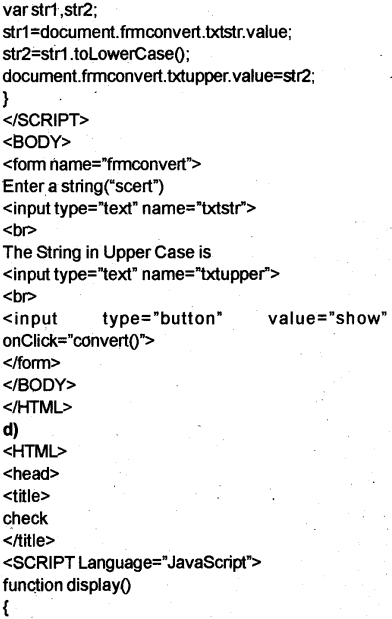
b) To convert the string “scert” to all capitals.
c) To convert the string “HTML” to all small letters.
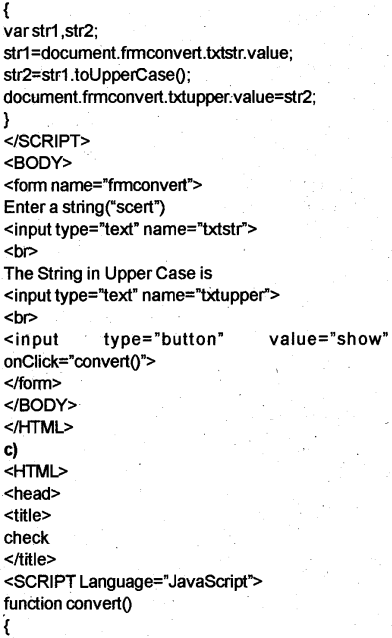
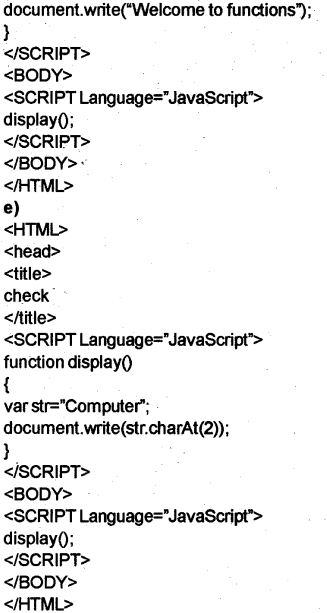
d) To display a message “Welcome to functions”.
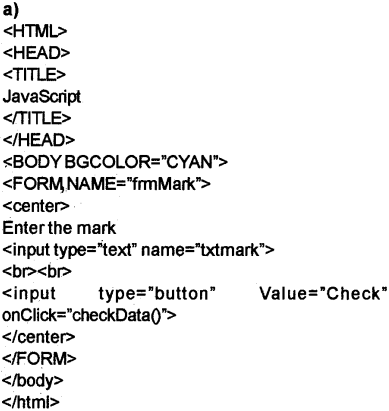
e) To display the third character in the string “Computer”.
Answer:
Plus Two Computer Science Chapter Wise Previous Questions Chapter 6 Client-Side Scripting Using JavaScript 33
Plus Two Computer Science Chapter Wise Previous Questions Chapter 6 Client-Side Scripting Using JavaScript 34
Plus Two Computer Science Chapter Wise Previous Questions Chapter 6 Client-Side Scripting Using JavaScript 35
Plus Two Computer Science Chapter Wise Previous Questions Chapter 6 Client-Side Scripting Using JavaScript 36
Plus Two Computer Science Chapter Wise Previous Questions Chapter 6 Client-Side Scripting Using JavaScript 37

Question 11.
Write JavaScript code to display the length of the string “Computer”. (3 Mark)
Answer:

<HTML>
<head>
<title>
length of a string
</title>
</head>
<BODY>
<SCRIPT Languages’JavaScript”>
var str.len;
str=”Computer";
len=str. length;
alert('The length of the string Computer is “+len);
</SCRIPT>
</BODY>
</HTML>

Question 12.
A web page contains a button. Write HTML code for the button which executes a function Message() on the occurrence of the following events. (2 Mark)
a) When a user clicks the mouse on the button.
b) When user moves the mouse over the button.
Answer:
a) <inputtype=”button”value=”Message”
onClick=”Message()”>

b) <input types”button” value=”Message”
onMouseEnter=”Message()”>

Question 13.
What are the advantages of writing JavaScript code in the head section of an HTML page? (2 Mark)
Answer:
Scripts can be placed inside the <HEAD> section. This method is widely accepted method. The main reason for this is that body section contains a large volume of text contents to be displayed on the web page. More over the head section is loaded before the body section.

Question 14.
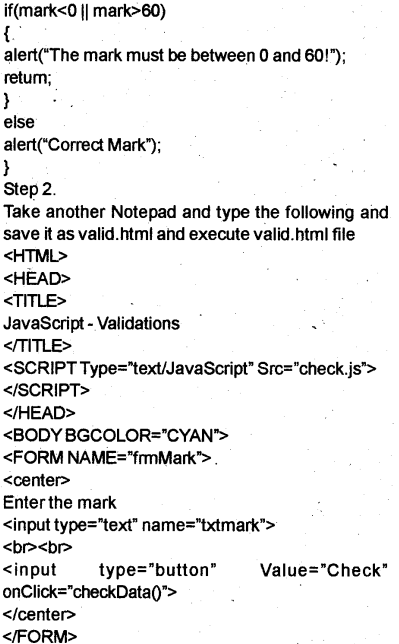
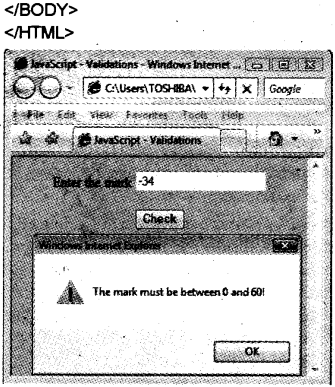
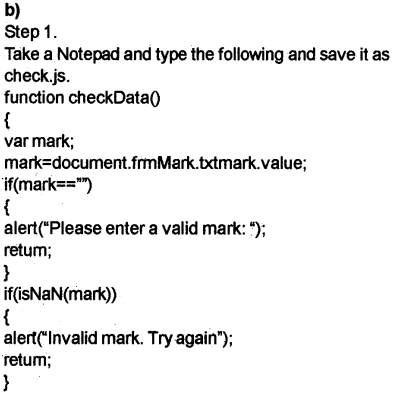
Design an HTML page that contains a text box to enter the marks in a given subject. (5 Mark)
a) Write HTML code for this web page
b) Provide validations for this text box in a separate JavaScript file and link it with the HTML file. The validations are
(i) it should not be empty
(ii) it should be a number
(iii) it should be between 0 and 60.
c) List the advantages of writing the script in a separate file.
Answer:
Plus Two Computer Science Chapter Wise Previous Questions Chapter 6 Client-Side Scripting Using JavaScript 39
Plus Two Computer Science Chapter Wise Previous Questions Chapter 6 Client-Side Scripting Using JavaScript 40
Plus Two Computer Science Chapter Wise Previous Questions Chapter 6 Client-Side Scripting Using JavaScript 41
Plus Two Computer Science Chapter Wise Previous Questions Chapter 6 Client-Side Scripting Using JavaScript 42

c) We can write scripts in a file and save it as a separate file with the extension .js. The advantage is that this file can be used across multiple HTML files and can be enhance the speed of page loading.


Plus Two Computer Science Chapter Wise Previous Questions Chapter 5 Web Designing Using HTML

Kerala State Board New Syllabus Plus Two Computer Science Chapter Wise Previous Questions and Answers Chapter 5 Web Designing Using HTML.

Kerala Plus Two Computer Science Chapter Wise Previous Questions and Answers Chapter 5 Web Designing Using HTML

Question 1.
Considerthe following HTML statement. [MARCH – 2007]
<Table>
<TR>
<TH>Mark</TH>
<TD>90</TD>
</TR>
</Table>
What is the difference between the content displayed in the cells of the table? (2)
Answer:
<TH> means table heading
<TD> means table data
‘Mark’ is contained in <TH></TH>. It will displayed as Table Heads in Bold letter.
90 is contained in <TD></TD>. It will displayed as normal letters.

Question 2.
While designing a web page Raju wants to display a table which occupies the full browser window. Name the attribute which help him to do so. [MARCH – 2007] (1)
Answer:
The attribute is Width,it can be given in percentage of total window width.
Eg. <Table Border=1 Width= “100%”>

Question 3.
Complete the following table. [MARCH – 2007] (3)

HTML Tag Use
1. <B>
2. <HR>
3 Un ordered List
4. <DL>
5 It is the line break tag
6 To display Heading in the biggest size

Answer:

HTML Tag Use
1. <B> To display content in Bold
2. <HR> Draws a Horizontal Ruler
3. <UL> Un ordered List
4. <DL> ‘ Define Definition List
5. <Br> It is the line break tag
6, <H1> To display Heading in the biggest size

Question 4
Abhijith wishes to submit the data entered by him using a form. The amount of data is less and security of data is not a prime factor. Which method he may select to submit the data ? justify your answer. [MARCH – 2008] (4)
Answer:
Get method

Question 5
Match the following [MARCH – 2008]

<HTML>  HREF
<A>  SIZE
<BODY>  SRC
<BASEFONT>  START
<OL>  DIR
<IMG>  TOPMARGIN

Answer:

<HTML>  DIR
<A>  HREF
<BODY>  TOPMARGIN
<BASEFONT>  SIZE
<OL>  START
<IMG>  SRC

Question 6.
Some browsers do not support frameset. In such a situation which alternative is used. Explain? [FEBRUARY – 2008] (3)
OR
Mention how <NOFRAMES> tag can help us.
Answer:
It is true, some browsers do not support frameset. In such a situation the container tag <noframes> is the alternative for frameset. It specifies the content to be shown, if the browser cannot load the frames. The content is given in a body section placed within the <noframes> tag pairs.

Question 7.
Classify the HTML related words : [FEBRUARY – 2008] (2)
Align, Frame, Href, Font.
Answer:
Attribute-Align, Href. Tag-Frame, Font

Question 8.
Aji wants to create a form in HTML to do the following: [JUNE – 2008]
1) Input name using text box.
2) Two Radio Buttons to select Male or Female.
3) InputAddress.
4) Submit Button with caption ‘OK’
Write HTML program forthe above. (5)
Answer:
1) <inputtype=’’text>
2) <inputtype=”radio” name=”sex” value=”male”> <inputtype=”radio” name-’sex” value=”female”>
3) <input type=”textarea>
4) <inputtype=”Submit” value=”ok”>

Question 9.
Midhun wants to create a web page for passing information from the user to the web server. Name the HTML tag which provides this facility. [MARCH – 2009] (1)
Answer:
<form> tag

Question 10.
Which tag can be used to provide hyperlinks in HTML? [MARCH – 2009] (1)
Answer:
<A> Tag

Question 11.
Write an HTML code to create a form with controls to accept the Reg no. of a student and to submit it. [MARCH – 2009] (2)
Answer:
<Form Method=”Get”Action=”http://www.dhse.com/ det.asp”>
Regno<inputtype=”text”><br>
<input type=”submit” value=”Submit>
</form>

Question 12.
Varun is creating a web page. He wants to create a link on the text ‘sample’ to a file named sample, htm which resides in a subdirectory named Exam of the D drive. Write the HTML command for this purpose. [MARCH – 2009] (2)
Answer:
<A Href = “D:\Exam\sample.htm”> Sample</A>

Question 13.
The default align value for a table is _________ [February – 2009]
(a) left
(b) right
(c) top
Answer:
left

Question 14.
Shabeer wants to divide the browser wondow into two sections. Which option of HTML can be used for this? [June – 2009] (1)
Answer:
<frameset>

Question 15.
Write an HTML code to create a select box with three list options low, medium and high with medium as default item. [June – 2009] (2)
Answer:

<html>
<head>
<title>
select box
</title>
</head>
<body>
<select>
<option>low
<option selected>medium
<option>high
</select>
</body>
</html>

Question 16.
Find out the output forthe following HTML statements and describe the tags using. [March -2010] (5)

<HTML>
<BODY>
<TABLE BORDER=1>
<TR>
<TD Colspan=2>College</TD>
</TR>
<TR>
<TR Rowspan=3>
</TR>
<TR>
<TD>Department1</TD>
</TR>
<TR>
<TD>Department 2</TD>
</TR>
<TR>
<TD>Department 3</TD>
</TR>
</TABLE>
</BODY>
</HTML>

Answer:
<HTML> tag is used to start the program.
<Body> Here contents are to be written.
<TABLE> is used to create a table.
<TR> is used to create a row.
<TD> is used to give table column data.

College
Departments Department 1
Department 2
Department 3

Question 17.
Write the HTML code for creating the following Webpage: [March -2010] (3)
ABC Pvt. Ltd.
HYDERABAD
1 .Health Care
2. Baby Products
a. Toys
b. Dress
3. Men’s Wear
* Casuals
* Formals
Answer:

<HTML>
<HEAD>
<TITLE> ABC Pvt.Ltd</TITLE>
<1HEAD>
<BODY>
<HI> ABC Pvt. Ltd. <Br>HYDERABAD</HI>
<OL>
<LI>HealthCare
<LI>Baby products
<OLType=”a”>
<L>Toys
<LI>Dress
</OL>
<LI> Mens Wear
<UL>
<LI>Casuals
<LI>Formals
</UL>
</OL>
</BODY>
</HTML>

Question 18.
Write the HTML code for the following table. [June – 2010] (3)

Subject Mark
Science Physics 40
Chemistry 35
Biology 48

Answer:

<html>
<head>
<title>
</title>
</head>
<body>
<table border=”1 ">
<tralign=”center”>
<td colspan=2>Subject
<td>mark
</tr>
<tralign=”center”>
<td rowspan=3>Science
<td>Physics
<td>40
</tr>
<tr align=”center”>
<td>Chemistry
<td>35
</tr>
<tralign=”center”>
<td>Biology
<td>48
</tr>
</table>
</body>
</html>

Question 19.
The tag used to create a menu in HTML is ……………… . [June – 2010] (2)
Answer:
<SELECT>

Question 20.
Write HTML tag to create a form with a text box and a submit button. [June – 2010] (2)
Answer:

<html>
<head>
<title>form
</title>
</head>
<body>
<form>
<input type=”text”>
<input type=’submit”>
</Body>
</HTML>

Question 21
List the steps for creating a hyperlink with an example. [June – 2010] (2)
Answer:
The power of HTML lies in the ability to provide hyperlinks. <A> tag is used for this. There are two types of Linking.
1) External Linking. External links are hyperlinks given to another page. By clicking on hypertext we can link or go to other webpages.
<A> Anchor tag is used for External Linking.
<A href= “c:\main. html”>Main</A>

2) Internal Linking- Internal Links are given to a section in the same document.
<HTML>
<HEAD>
<Title>lnternal linking</Title>
</HEAD>
<Body>
<p><A name=”Bio”>Biology Group</A><BR>
Subject combinations are Physics, Chemistry, Mathematics and Biology. <P>
<P><A Name= “comp”> computergroup</A> <BR>
Subject combination are Physics, Chemistry, Mathematics and Computer Science. <P>
<P><A name = “Comm’’> Commerce Group</A> <BR>
The subject combination are Business studies, Economics, Accountancy and Computer Application
<br><A href=”#Bio’’>Go Biology</A>
<br><A href=”#Comp”>Go Computer</A>
<br><A href=”#Comm’’>Go Commerce</A>
</p>
</Body>
</HTML>

Question 22.
Write a HTML code for displaying the following table. [March -2011] (3)

Object  Property  Value
Form 1  Caption  First Form
Command 1  Caption  Show Next
Command 2  Caption  Exit

Answer:

<html>
<head>
<title>
table
</title>
</head>
<body bgcolor=’ ’vbcyan”>
<table border=1>
<tr>
<th>Objectc/th>
<th>Property</th>
<th>Valu e<Ith>
</tr>
<tr>
<td>Form1</td>
<td>Caption</td>
<td>First Form</td>
</tr>
<tr>
<td>Command1 </td>
<td>Caption</td>
<td>Show Next</td>
</tr>
<tr>
<td>Command2</td>
<td>Caption</td>
<td>Exit</td>
</tr>
</body>
</html>

Question 23.
In HTML, FORM tag can accept user input and communicate it to a server program. [March -2011]
(a) Write the general format of FORM tag. (1)
(b) How will you Construct a ‘SUBMIT’ button and a RESET’ button within the FORM tag? (2)
Answer:
a) <form action=url/mailto method=get/post> </form>
b) <input type=”submit”>
<input type=”reset”>

Question 24.
HTML has the facility to provide External links as well as Internal links. [March -2011] (3)
a) Which tag is used to include an External link?(1)
b) How will you construct an Internal link? (2)
Answer:
a) Anchor Tag i.e. <a href=”filename”>
b) Internal link is used to linktwo places of the same web page

<html>
<head>
<title>
Internal link
</title>
</head>
<body bgcolor=”vbcyan”>
<a name=top href=#bottom>Goto Bottom</a>
<ultype=”circle”>
<li>Form
<li>TextBox
<li>Label
<li>CommandButton
</ul>
<a name=bottom href=#top>Goto top</a> </body>
</html>

Question 25.
Write the HTML code for creating the following table: [March – 2012] (3)
Item – Price – Qty.
Soap – 15 10
Book – 23 12
Pen – 10 14
Answer:

<html>
<head>
<title>
table
</title>
</head>
<body>
<table bonder=1> <tr>
<th>ltem</th>
<th>Price</th>
<th>Qty</th>
</tr>
<tr>
<td>Soap</td>
<td>15</td>
<td>10</td>
</tr>
<tr>
<td>Book</td>
<td>23</td>
<td>12</td>
</tr>
<tr>
<td>Pen</td>
<td> 10</td>
<td> 14</td>
</tr>
</table>
</body>
</html>

Question 26.
Suggest an alternate tag for a browser which do not support frames tag. [March – 2012] (1)
Answer:
<Noframes>

Question 27.
What is the importance of .NET technology? [March – 2012] (2)
Answer:
NET is one of the latest technologies introduced by Microsoft Corporation. With the help of .NET a de veloper can use a programming language of his choice to quickly and easily develop distributed ap plications. Distributed application means process ing take place in any processor is free in the net work. It Is similar to JVM. It is platform independent.

Eg:ASP.NET, VB.NET

Question 28.
The <DD> tag gives _________ [March 2016] (1)
Answer:
Data Description or Data Definition.

Question 29.
Create a table with 5 types of fruit names, use headings as serial number, name and cost.
OR
Create an ordered list of five fruits numbered using small Roman numerals. (5)
Answer:

<html>
<head>
<title>
table creation
</title>
</head>
<body bgcolor =“red”>
<table bonder = “1”>
<tr>
<th> Serial No</th>
<th> Name </th>
<th> cost</th>
</tr>
<tr>
<td>1</td>
<td> Banana </td>
<td> Rs. 49 </td>
</tr>
<tr>
<td>2</td>
<td>grapes</td>
<td>Rs.110</td>
</tr>
<tr>
<td>3</td>
<td>Apple</td>
<td>Rs.180<ftd>
</tr>
<tr>
<td>4</td>
<td>Orange</td>
<td>Rs.60</td>
<td>5</td>
<td>Mango</td>
<td>Rs. 40<ltd>
</tr>
</table>
</body>
</html>
<html>
<head>
<title>
Ordered list demonstration
</title>
</head>
<body bgcolor=red;
<H1> Fruits </H1>
<OLType= "i">
<li> Apple </ii>
<li>Grapes </li>
<li>Orange </li>
<li> Mangoc/li>
<li> Banana </li>
</OL>
</ Body>
</html>

Question 30.
Rahim wants to connect his webpage to www.yahoo.com. Write the tag and attributes required for these. [May – 2016] (2)
Answer:
<A> tag with href attribute is used for this
eg: <A href= “httpp://www.yahoo.com”>
Yahoo</A>

Question 31.
a) What are the difference between GET and POST methods in form submitting? [May – 2016] (2)
b) Study the following steps and determine the correct order:
(1) Open a connection to MySQL server
(2) Execute the SQL query
(3) Fetch the data from query
(4) Select database
(5) Close connection
(a) 4, 1,2, 3, 5
(b) 1,4, 2. 3, 5
(c) 1,5, 4, 2, 3
(d) 4,1,3, 2, 5 (1)
Answer:
a) Refer 3 Mark Question 12
b) (b) 1,4, 2, 3; 5

Question 32.
A link to a particular section of the same document is called …………….. [March – 2017] (1)
Answer:
Internal linking.

Question 33.
Create a web page using frames for Tourism department showing list of tourist places in Kerala. When a place is selected a detailed description should be available in a separate window.
OR
Create a form that accepts information regarding a student. Fields necessary are name, age, class, sex, roll number, hobbies and date of birth. Use appropriate form controls. [March – 2017] (5)
Answer:
By using target property , we can design like this. Considerthe following five files.
Step 1. Take a notepad and type the following and save it as main.html on C:\

<html>
<head>
<title>
Tourist places in Kerala
</title>
</head>
<body bgcolor=”cyan”>
<h1><u><b><center>Tourist Places in Keralac/ center></b></u></h1 >
<ol>
<li><a href=”tvm.html” target=”f2">Thiruvanathapur- am<7a></li>
<li><a href=”ekm.html” target=”f2">Emakulam</ a></li>
<li><a href=”clt.html” target=”f2">Calicut</ax/li>
</ol>
</body>
</html>

Step 2. Take a notepad and type the following and save it as tvm.html on C:\

<html>
<head>
<title>
Tourist places in Kerala
</title>
</head>
<body bgcolor=”cyan”>
<h1><u><b><center>Thiruvanathapuram</center></b></ux/h1><ul>
<li>Kovalam</li>
<li>Zoo</li>
<li>Padmanabha Swami Temple</li>
</ul>
</body>
</html>

Step 3. Take a notepad and type the following and save it as ekm.html on C:\

<html>
<head>
<title>
Tourist places in Kerala
</title>
</head>
<body bgcolor="cyan”>
<h1><u><b><center>Emakulam</center></b></ u></h1 >
<ul>
<li>Bolghatty Palace</li>
<li>ShipYard</li>
<li>Marine Drive</li>
</ul>
</body>
</html>

Step 4. Take a notepad and type the following and save it as clt.html on C:\

<html>
<head>
<title>
Tourist places in Kerala
</title>
</head>
<body bgcolor=”cyan”>
<h1 ><u><b><center>Calicut</center></b></u></ h1>
<ul>
<li>Kappad Beach</li>
<li>Planetorium</li>
<li>Mananchira</li>
</ul>
</body>
</html>

Step 5. Take a notepad and type the following and ‘ save it as frame.html on C:\

<html>
<head>
<title>
fiame
</title>
<frameset cols=”33% ,*”>
<frame src=”main.htmr>
<frame src=”tvm.htmr name=”f2">
</frameset>
</html>

Step 6. Execute frame.html we will get the output.
OR

<html>
<head>
<title>
form
</trtle>
</head>
<body bgcolor="cyan">
<form method=”post” action=”fa.php”>
<h1 ><u><center><b> Application Form</b></ center></u></h1>
Name &nbsp;&nbsp;
<input type="text” name="txtname”>
<br>
Age &nbsp;&nbsp;&nbsp;&nbsp;&nbsp;
<br>
Class &nbsp;&nbsp;&nbsp;
<input type=”text” name=”txtclass”>
<br>
Sex &nbsp;&nbsp;&nbsp;&nbsp;&nbsp;
Male<input type=”radio” name=”optsex” value=”Male”>
Female<input type=”radio” name=”optsex” value=”Female”>
<br>
Roll No
<input type=”text” name=”txtroll” size=”1 ">
<br>
Hobbies
Reading<input type=”checkbox” name=”cbread”>
Singing<input type=”checkbox” name=”cbsing”>
Playing<input type=”checkbox” name=”cbplay”>
<br>
Date of Birth
<input type=”text” name=”txtdob” size=”1 ">
<br><br>
<in put ty pe=”subm it” val ue=”su bmit”>
<input type=”reset” value=”reset”>
</form>
</body>
</html>

Question 34.
Which HTML tag is used to create ordered list? [May – 2017] (1)
Answer:
<ol>

Question 35.
Write an HTML code for a web page to show the following detailsin blue background: [May – 2017] (3)
Components of a Computer
* Hardware
1. RAM
2. ROM
3. Hard Disk

* Software
1. System Program
2. Application program
Answer:

<html>
<head>
<title>
list demo
</title>
</head>
<body bgcolor=”blue”>
Components of a Computer
<ul type=”disc”>
<li>Handware</li>
<ol>
<li>RAM</li>
<li>Rom</li>
<li>Hard Disk</li>
</ol>
<li>Software</li>
<ol>
<li>System Program</li>
<li>Application Program</li>
</ol>
</ul>
</body>
</html>

Question 36.
<FORM> tag contains some other tags to facilitate interaction between user and web page. Write any two control tags and explain their mode of interaction. [May – 2017] (2)
Answer:
<lnput> It is used to create input controls. Its type attribute determines the control type.
Main values of type attribute is given below.
1. Text – To create a text box.
2. Password – To create a password text box.
3. Checkbox – To create a check box.
4. Radio-To create a radio button.
5. Reset – To create a Reset button.
6. Submit-To create a submit button.
7. Button – To create a button

Question 37.
a) Write an HTML code for a web page for your supermarket named “HELPLINE SUPER MARKET’ with the following details and features. [May – 2017]
1) A heading followed by a paragraph of 2 sentences about the district using text formatting tags and attributes.
2) Give postal address of the supermarket with phone number and email id. .
3) Include a marquee that “Hurry up, 50% off for all purchase”. (5)
OR
b) Explain and compare the features of any four scripting languages. (5)
Answer:
a)

<html>
<head>
<title>
HelpLine Super Market
</title>
</head>
<body bgcolor=”cyan”>
<marquee bgcolop=”red” height=”40"> Hurry up, 50% offforall purchase</manquee>
<h1alig.n=”Center”>HELPLINE<br> SUPERMARKET </h1>
<h2 align=”left”><u><i>Trichur</i></u></h2>
<p>Our district is Trichur. It is situated in the central part of Kerala
</p>
Postal Address
<br>
HELPLINE SUPER MARKET,
<br>
Main Road,
Irinjalakuda.
<br>
Phone No.9999900000.
<br>
Email Id: info@helpline.com.
</body>
</html>

b) 1) JavaScript: Java script(developed by Brendan Eich for the Netscape browser) is a platform-independent scripting language. Means It does not require a particular browser. That is it runs on any browser hence it is mostly accepted scripting language.

2) VB Script: VB Script(developed by Microsoft) is a platform-dependent scripting language. Means it requires a particular browser(MS Internet Explorer) to work that is why it is not a widely accepted scripting language.

3) Active Server Pages (ASP)
1) ASP introduced by Microsoft
2) ASP stands for Active Server Page.
3) ASP’s are web pages that are embedded with dynamic contents, such as text.HTML tags and scripts.
4) An ASP file uses .asp extension.
5) In ASP, the script execute in the server and the effect will be sent back to the client computer.
6) Here a real time communication exists between the client and server.
7) ASP applications are very small.
8) The only server used is Microsoft Internet Information Server(IIS), hence it is platform dependant

4) Java Server Pages (JSP)
1) JSP introduced by Sun Micro System
2) JSP stands for Java Server Page.
3) An JSP file uses .jsp extension
4) It is platform independent
5) It uses Apache Tomcat web server
6) JSP binds with Servlets(Servlets are Java codes run in Server to serve-the client requests).
Plus Two Computer Science Chapter Wise Previous Questions and Answers Kerala

HSE Kerala Board Syllabus HSSLive Plus Two Computer Science Chapter Wise Previous Questions and Answers Pdf Free Download in both English Medium and Malayalam Medium are part of SCERT Kerala Plus Two Chapter Wise Previous Questions and Answers. Here HSSLive.Guru have given Higher Secondary Kerala Plus Two Computer Science Chapter Wise Previous Year Important Questions and Answers based on CBSE NCERT syllabus.
Board SCERT, Kerala
Text Book NCERT Based
Class Plus Two
Subject Computer Science
Chapter All Chapters
Category Kerala Plus Two

Kerala Plus Two Computer Science Chapter Wise Previous Year Questions and Answers

We hope the given HSE Kerala Board Syllabus HSSLive Plus Two Computer Science Chapter Wise Previous Questions and Answers Pdf Free Download in both English Medium and Malayalam Medium will help you. If you have any query regarding Higher Secondary Kerala Plus Two Computer Science Chapter Wise Previous Year Important Questions and Answers based on CBSE NCERT syllabus, drop a comment below and we will get back to you at the earliest.

Plus Two Accountancy Chapter Wise Previous Questions and Answers Kerala

HSE Kerala Board Syllabus HSSLive Plus Two Accountancy Chapter Wise Previous Questions and Answers Pdf Free Download in both English Medium and Malayalam Medium are part of SCERT Kerala Plus Two Chapter Wise Previous Questions and Answers. Here HSSLive.Guru have given Higher Secondary Kerala Plus Two Accountancy Chapter Wise Previous Year Important Questions and Answers based on CBSE NCERT syllabus.

Board SCERT, Kerala
Text Book NCERT Based
Class Plus Two
Subject Accountancy
Chapter All Chapters
Category Kerala Plus Two

Kerala Plus Two Accountancy Chapter Wise Previous Year Questions and Answers

Part I: Accountancy

Part II: Computerised Accounting

  • Chapter 1 Overview of Computerised Accounting System
  • Chapter 2 Spread Sheet
  • Chapter 3 Use of Spread Sheet in Business Application
  • Chapter 4 Graphs and Charts for Business Data
  • Chapter 5 Accounting Software Package – GNUKhata
  • Chapter 6 Data Base Management System for Accounting

We hope the given HSE Kerala Board Syllabus HSSLive Plus Two Accountancy Chapter Wise Previous Questions and Answers Pdf Free Download in both English Medium and Malayalam Medium will help you. If you have any query regarding Higher Secondary Kerala Plus Two Accountancy Chapter Wise Previous Year Important Questions and Answers based on CBSE NCERT syllabus, drop a comment below and we will get back to you at the earliest.

Plus Two Business Studies Chapter Wise Previous Questions and Answers Kerala

HSE Kerala Board Syllabus HSSLive Plus Two Business Studies Chapter Wise Previous Questions and Answers Pdf Free Download in both English Medium and Malayalam Medium are part of SCERT Kerala Plus Two Chapter Wise Previous Questions and Answers. Here HSSLive.Guru have given Higher Secondary Kerala Plus Two Business Studies Chapter Wise Previous Year Important Questions and Answers based on CBSE NCERT syllabus.

Board SCERT, Kerala
Text Book NCERT Based
Class Plus Two
Subject Business Studies
Chapter All Chapters
Category Kerala Plus Two

Kerala Plus Two Business Studies Chapter Wise Previous Year Questions and Answers

We hope the given HSE Kerala Board Syllabus HSSLive Plus Two Business Studies Chapter Wise Previous Questions and Answers Pdf Free Download in both English Medium and Malayalam Medium will help you. If you have any query regarding Higher Secondary Kerala Plus Two Business Studies Chapter Wise Previous Year Important Questions and Answers based on CBSE NCERT syllabus, drop a comment below and we will get back to you at the earliest.

Plus Two Economics Chapter Wise Previous Questions and Answers Kerala

HSE Kerala Board Syllabus HSSLive Plus Two Economics Chapter Wise Previous Questions and Answers Pdf Free Download in both English Medium and Malayalam Medium are part of SCERT Kerala Plus Two Chapter Wise Previous Questions and Answers. Here HSSLive.Guru have given Higher Secondary Kerala Plus Two Economics Chapter Wise Previous Year Important Questions and Answers based on CBSE NCERT syllabus.

Board SCERT, Kerala
Text Book NCERT Based
Class Plus Two
Subject Economics
Chapter All Chapters
Category Kerala Plus Two

Kerala Plus Two Economics Chapter Wise Previous Year Questions and Answers

Part – I: Introductory Microeconomics

Part – II: Introductory Macroeconomics

We hope the given HSE Kerala Board Syllabus HSSLive Plus Two Economics Chapter Wise Previous Questions and Answers Pdf Free Download in both English Medium and Malayalam Medium will help you. If you have any query regarding Higher Secondary Kerala Plus Two Economics Chapter Wise Previous Year Important Questions and Answers based on CBSE NCERT syllabus, drop a comment below and we will get back to you at the earliest.

HSSLive Plus Two

Plus Two Zoology Chapter Wise Previous Questions and Answers Kerala

HSE Kerala Board Syllabus HSSLive Plus Two Zoology Chapter Wise Previous Questions and Answers Pdf Free Download in both English Medium and Malayalam Medium are part of SCERT Kerala Plus Two Chapter Wise Previous Questions and Answers. Here HSSLive.Guru have given Higher Secondary Kerala Plus Two Zoology Chapter Wise Previous Year Important Questions and Answers based on CBSE NCERT syllabus.

Board SCERT, Kerala
Text Book NCERT Based
Class Plus Two
Subject Zoology
Chapter All Chapters
Category Kerala Plus Two

Kerala Plus Two Zoology Chapter Wise Previous Year Questions and Answers

We hope the given HSE Kerala Board Syllabus HSSLive Plus Two Zoology Chapter Wise Previous Questions and Answers Pdf Free Download in both English Medium and Malayalam Medium will help you. If you have any query regarding Higher Secondary Kerala Plus Two Zoology Chapter Wise Previous Year Important Questions and Answers based on CBSE NCERT syllabus, drop a comment below and we will get back to you at the earliest.

HSSLive Plus Two

Plus Two Botany Chapter Wise Previous Questions and Answers Kerala

HSE Kerala Board Syllabus HSSLive Plus Two Botany Chapter Wise Previous Questions and Answers Pdf Free Download in both English Medium and Malayalam Medium are part of SCERT Kerala Plus Two Chapter Wise Previous Questions and Answers. Here HSSLive.Guru have given Higher Secondary Kerala Plus Two Botany Chapter Wise Previous Year Important Questions and Answers based on CBSE NCERT syllabus.

Board SCERT, Kerala
Text Book NCERT Based
Class Plus Two
Subject Botany
Chapter All Chapters
Category Kerala Plus Two

Kerala Plus Two Botany Chapter Wise Previous Year Questions and Answers

We hope the given HSE Kerala Board Syllabus HSSLive Plus Two Botany Chapter Wise Previous Questions and Answers Pdf Free Download in both English Medium and Malayalam Medium will help you. If you have any query regarding Higher Secondary Kerala Plus Two Botany Chapter Wise Previous Year Important Questions and Answers based on CBSE NCERT syllabus, drop a comment below and we will get back to you at the earliest.

HSSLive Plus Two

Plus Two Chemistry Chapter Wise Previous Questions and Answers Kerala

HSE Kerala Board Syllabus HSSLive Plus Two Chemistry Chapter Wise Previous Questions and Answers Pdf Free Download in both English Medium and Malayalam Medium are part of SCERT Kerala Plus Two Chapter Wise Previous Questions and Answers. Here HSSLive.Guru have given Higher Secondary Kerala Plus Two Chemistry Chapter Wise Previous Year Important Questions and Answers based on CBSE NCERT syllabus.

Board SCERT, Kerala
Text Book NCERT Based
Class Plus Two
Subject Maths
Chapter Chemistry
Category Kerala Plus Two

Kerala Plus Two Chemistry Chapter Wise Previous Year Questions and Answers

We hope the given HSE Kerala Board Syllabus HSSLive Plus Two Chemistry Chapter Wise Previous Questions and Answers Pdf Free Download in both English Medium and Malayalam Medium will help you. If you have any query regarding Higher Secondary Kerala Plus Two Chemistry Chapter Wise Previous Year Important Questions and Answers based on CBSE NCERT syllabus, drop a comment below and we will get back to you at the earliest.

Plus Two Physics Chapter Wise Previous Questions and Answers Kerala

HSE Kerala Board Syllabus HSSLive Plus Two Physics Chapter Wise Previous Questions and Answers Pdf Free Download in both English Medium and Malayalam Medium are part of SCERT Kerala Plus Two Chapter Wise Previous Questions and Answers. Here HSSLive.Guru has given Higher Secondary Kerala Plus Two Physics Chapter Wise Previous Year Important Questions and Answers based on CBSE NCERT syllabus.

Board SCERT, Kerala
Text Book NCERT Based
Class Plus Two
Subject Physics
Chapter All Chapters
Category Kerala Plus Two

Kerala Plus Two Physics Chapter Wise Previous Year Questions and Answers

  • Chapter 1 Electric Charges and Fields
  • Chapter 2 Electric Potential and Capacitance
  • Chapter 3 Current Electricity
  • Chapter 4 Moving Charges and Magnetism
  • Chapter 5 Magnetism and Matter
  • Chapter 6 Electromagnetic Induction
  • Chapter 7 Alternating Current
  • Chapter 8 Electromagnetic Waves
  • Chapter 9 Ray Optics and Optical Instruments
  • Chapter 10 Wave Optic
  • Chapter 11 Dual Nature of Radiation and Matter
  • Chapter 12 Atoms
  • Chapter 13 Nuclei
  • Chapter 14 Semiconductor Electronics: Materials, Devices and Simple Circuits
  • Chapter 15 Communication Systems

We hope the given HSE Kerala Board Syllabus HSSLive Plus Two Physics Chapter Wise Previous Questions and Answers Pdf Free Download in both English Medium and Malayalam Medium will help you. If you have any query regarding Higher Secondary Kerala Plus Two Physics Chapter Wise Previous Year Important Questions and Answers based on CBSE NCERT syllabus, drop a comment below and we will get back to you at the earliest.

HSSLive Plus Two