Plus Two Business Studies Notes Chapter 13 Entrepreneurial Development

Kerala State Board New Syllabus Plus Two Business Studies Notes Chapter 13 Entrepreneurial Development.

Kerala Plus Two Business Studies Notes Chapter 13 Entrepreneurial Development

Meaning

All activities undertaken by an entrepreneur to bring a business unit into existence are collectively known as entrepreneurship. An entrepreneur is a person who undertakes the risk of a new enterprise. The business unit is called an enterprise.

Characteristics of Entrepreneurship

  • It is a systematic and purposeful activity.
  • The object of entrepreneurship is a lawful business.
  • Entrepreneurship is a creative response to the environment and the ability to exploit an economic opportunity.
  • It is concerned with employing, managing, and developing the factors of production.
  • Entrepreneurship involves risk. Profit is the reward of risk taking.

Relationship between Entrepreneurship and Management

Entrepreneurship:

  • The main motive of an entrepreneur is to start a venture by setting up an enterprise.
  • An entrepreneur is the owner of the enterprise.
  • An entrepreneur assumes all risks and uncertainty.
  • An entrepreneur gets profit.
  • An Entrepreneur acts as an innovator.
  • Entrepreneur is self motivated

Management:

  • The main motive of a manager is to render his services in an enterprise already set up by someone.
  • A manager is the servant in the enterprise.
  • A manager does not bear any risk involved in the enterprise.
  • A manager gets salary.
  • Manager executes the plans prepared by the entrepreneur.
  • Manager is motivated by entrepreneur.

Functions (Role) of Entrepreneurs in Relation to Economic Development

1) Contribution to GDP: Entrepreneurs explore and exploit opportunities, encourage effective resource mobilisation of capital and skill, bring in new products and services and develops markets for growth of the economy. In this way, they help increasing gross national product (GDP) as well as per capita income of the people in a country.

2) Capital Formation: Entrepreneurs promote capital formation by mobilising the idle savings of public. They employ these resources for setting up an enterprise.

3) Generation of Employment: With the setting up of more andmore business units by entrepreneurs, a large number of employment opportunities are created.

4) Promotes Balanced Regional Development: Entrepreneurs help to remove regional disparities through setting up of industries in less developed and backward areas.

5) Reduces Concentration of Economic Power: A large number of entrepreneurs needs to be developed, which will help reduce the concentration of economic power amongst the population.
6) Improvement in the Standard of Living: Entrepreneurs enables the people to avail better quality goods at lower prices which results in the improvement of their standard of living.

7) Promotes Export Trade: Entrepreneurs help in promoting a country’s export-trade, which is an important ingredient of economic development.

8) Facilitates Overall Development: The entrepreneurs multiply their entrepreneurial activities, thus creating an environment of enthusiasm and invite others for overall development of the area.

Role of Entrepreneurs in Relation to their Enterprise

  • Perceiving market opportunities
  • Gaining command over scarce resources.
  • Marketing of the products.
  • Face the competition
  • Dealing with public bureaucracy (concession, licenses and taxes)
  • Managing the human relation within the firm.
  • Managing customer and supplier relations.
  • Managing finance.
  • Acquiring and overseeing assembly of the factory.
  • Improve the quality of the products

Process of Setting up a Business

Plus Two Business Studies Notes Chapter 13 Entrepreneurial Development 1

Entrepreneurial Competencies

  • He has the ability to take or initiate the first move towards setting up of an enterprise.
  • He is always on the lookout or searching for opportunity and is ready to exploit it in the best interest of the enterprise.
  • Successful entrepreneur finds ways to do things faster with fewer resources at tower costs.
  • He belives in systematic planning and its proper execution to reach goals.
  • An entrepreneur is never disheartened by failures. He follows try-try again for overcoming the obstacles.
  • An entrepreneur is always in search of new ideas from various sources.
  • He has the ability to understand and solve business problems.
  • He must be optimistic

Qualities of an entrepreneur can be summarised as follows

Plus Two Business Studies Notes Chapter 13 Entrepreneurial Development 2

Entrepreneurial Motivation

The entrepreneurial motivation may be defined as the process that activates and motivates the entrepreneur to exert higher level of efforts for the achievement of organisational goals.

1) Need for Achievement (N-Ach.): Need for achievement implies a desire to accomplish something difficult. They are intrinsically motivated. They prefer work that has a moderate chance for success (about 50/50) and tend to avoid situations that are low-risk and those that are high-risk.

2) Need for Power (N-Pow): Need for Power is the concern for influencing people or the behaviour of others for moving in the chosen direction and attaining the envisioned objectives.

3) Need for Affiliation (N-Aff.): The need for affiliation is characterised by a desire to belong, an enjoyment of teamwork, a concern about interpersonal relationships, etc.

4) Need for Autonomy (N-Aut.): The need for autonomy is a desire for independence and being responsible and accountable to oneself rather than some external authority for performance.

Entrepreneurial Values and Attitudes

Entrepreneurial values and attitudes refer to the behavioural choices of individuals make for success in entrepreneurship.

Plus Two Business Studies Notes Chapter 12 Consumer Protection

Kerala State Board New Syllabus Plus Two Business Studies Notes Chapter 12 Consumer Protection.

Kerala Plus Two Business Studies Notes Chapter 12 Consumer Protection

Meaning

There is a need for providing adequate protection to consumers against unscrupulous, exploitative and unfair trade practices of the sellers.

Importance of Consumer Protection

1) From Consumers’ point of view:

  • It is necessary to educate the customers about their rights.
  • Consumers need to be organised in the form of consumer organisations that would take care of their interests.
  • To protect consumers from unscrupulous, exploitative, and unfair trade practices.

2) From the Point of View of Business:

  • Business firms should aim at long-term profit maximization through customer satisfaction.
  • Business organisations use resources that belong to society.
  • A business has social responsibilities towards various interest groups.
  • It is the moral duty of any business to take care of consumer’s interest and avoid any form of their exploitation.
  • A business engaging in any form of exploitative trade practices would invite government intervention or action.

Legal Protection to Consumers

The Indian legal framework consists of a number of regulations which provide protection to consumers.
They are:

  • The Consumer Protection Act 1986
  • The Indian Contract Act 1812
  • The Sale of Goods Act 1930
  • The essential commodities Act 1955
  • The Agricultural Produce (Grading & Marketing) Act 1937
  • The Prevention of Food Adulteration Act 1954
  • The Standards of Weights and Measures Act 1976
  • The Trade Marks Act of 1999
  • The Competition Act 2002
  • The Bureau of Indian Standards Act 1986.

The Consumer Protection Act, 1986 (CPA): The Consumer Protection Act was passed in 1986 and it came into force from 1 July 1987. The main objectives of the Act are to provide better and all-round protection to consumers and effective safeguards against different types of exploitation. It also makes provisions for simple, speedy, and inexpensive machinery for redressal of consumers’ grievances.

Features of Consumer Protection Act 1986:

  • It applies to all goods and services except the goods exempted by the government.
  • Public, private and the co-operative sectors are covered by the Act.
  • It safeguards consumers against different types of exploitation.
  • It covers important consumer rights.

Consumer Rights

  • Right to Safety: The consumer has a right to be protected against goods and services which are hazardous to life and health.
  • Right to be Informed: The consumer has a right to have complete information about the product he intends to buy including its ingredients, date of manufacture, price, quantity, directions for use, etc.
  • Right to Choose: The consumer has the freedom to choose from a variety of products at competitive prices.
  • Right to be Heard: The consumer has a right to file a complaint and to be heard in case of dissatisfaction with goods or services.
  • Right to seek Redressal: The consumer has a right to get relief in case the product or service falls short of his expectations.
  • Right to Consumer Education: The consumer must be educated about the rights and remedies available under different laws.

Consumer’s Responsibilities

  • Be aware of various goods and services available in the market.
  • Buy only standardised goods as they provide quality assurance.
  • Learn about the risks associated with products and services, follow the manufacturer’s instructions and use the products safely.
  • Read labels carefully so as to have information about prices, net weight, manufacturing and expiry dates, etc.
  • Choose only from legal goods and services.
  • Ask for a cash memo on purchase of goods or services.
  • File a complaint in an appropriate consumer forum in case of poor quality of goods or services.
  • Form consumer societies which would play an active part in educating consumers.

Ways and Means of Consumer Protection

  • Self Regulation by Business: Many firms have set up their customer service and grievance cells to redress the problems and grievances of their consumers.
  • Business Associations: The Associations of trade, commerce and business like Federation of Indian Chambers of Commerce of India (FICCl) and Confederation of Indian Industries (Cl I) have laid down their code of conduct for their members in their dealings with the customers.
  • Consumer Awareness: A consumer, who is well informed about his rights, responsibilities and the reliefs available to him, would be in a position to raise his voice against any unfair trade practices or unscrupulous exploitation.
  • Consumer Organisations: Consumer organisations play an important role in educating consumers about their rights and providing protection to them.
  • Government: The government can protect the interests of the consumers by enacting various legislations.

Redressal Agencies under the Consumer Protection Act 1986

For the redressal of consumer grievances, the Consumer Protection Act provides for setting up of a three-tier enforcement machinery at the District, State, and the National levels. They are:

  1. District Forum
  2. State Commission
  3. National Commission

1) District Forum: This is established in each district by the state government. The District Forum consists of a president and two other members. A complaint can be made to the appropriate District Forum when the value of the goods or services and compensation claimed does not exceed Rs. 20 lakh. In case the aggrieved party is not satisfied with the order of the District Forum, he can appeal before the State Commission within 30 days of the passing of the order.

2) State Commission: It is established by the state government. The State Commission consists of a president and not less than two other members. A complaint can be filed before the State Commission where the value of goods or services and the compensation claimed exceeds Rs. 20 lakh but does not exceed Rs. 1 crore.ln case the aggrieved party is not satisfied with the order of the State Commission he can appeal to the National Commission within 30 days of passing of the order.

3) National Commission: The National Commission was constituted by the central government. The National Commission consists of a president and at least four other members. It is the apex body in the three-tier judicial machinery set up by the government for the redressal of consumer grievances. All complaints pertaining to those goods or services and compensation whose value is more than Rs. 1 crore can be filed directly before the National Commission. An appeal can be filed against the order of the National Commission to the Supreme Court within 30 days from the date of order passed.

Relief Available to Consumers (Remedies)

  • To remove the defect in goods or deficiency in service.
  • To replace the defective product with a new one, free from any defect.
  • To refund the price paid for the product.
  • To pay a reasonable amount of compensation for any loss or injury suffered by the consumer.
  • To discontinue the unfair/restrictive trade practice.
  • Not to offer hazardous goods for sale.
  • To withdraw the hazardous goods from sale.
  • To issue corrective advertisement to neutralise the effect of a misleading advertisement.

Role of Consumer Organisations and Non-governmental Organizations (NGOs.)

  • Educating the general public about consumer rights by organising training programmes, seminars, and workshops.
  • Publishing periodicals and other publications.
  • Collecting various samples of different goods and testing their quality.
  • Encouraging consumers to protest against exploitative and unfair trade practices of sellers.
  • Providing legal assistance to consumers by way of providing aid, legal advice, etc.
  • Filing complaints inappropriate consumer courts on behalf of the consumers.
  • Encouraging consumers to boycott defective goods.
  • Encouraging consumers to purchase consumer-friendly products.
  • Taking an initiative in filing cases in consumer courts in the interest of the general public.

Some of the important consumer organisations and NGOs engaged in consumer protection are:

  • Consumer Co-ordination Council, Delhi.
  • Voluntary Organisation in Interest of Consumer Education (VOICE).
  • Common Cause, Delhi.
  • Consumer Protection Council, Ahmedabad.
  • Consumer Guidance Society of India, Mumbai.
  • Consumer’s Association, Kolkatta, etc.

Consumer

Under the Consumer Protection Act, a consumer is defined as:

  1. Any person who buys any goods for consideration.
  2. Any person who hires or avails of any service, for a consideration.

Who can File a Complaint?: Complaint before the appropriate consumer forum can be made by

  • Any consumer.
  • The Central Government or any State Government.
  • One or more consumers, on behalf of numerous consumers having the same interest.
  • A legal heir or representative of a deceased consumer.

Plus Two Computer Science Notes Chapter 11 Advances in Computing

Kerala State Board New Syllabus Plus Two Computer Science Notes Chapter 11 Advances in Computing.

Kerala Plus Two Computer Science Notes Chapter 11 Advances in Computing

Distributed Computing Paradigms

Very large program is sub divided into smaller ones and distributed these small ones to free computers over network. Hence ensures the use of computers effectively. The term paradigm means a pattern ora model in the study of any subject of complexity. Advanced computing paradigms helps to process information for many sectors of our society. It includes parallel computing, cluster computing, grid computing, cloud computing, etc.

Distributed Computing

Definition: Distributed computing is a method of computing in which large problems can be divided into smaller ones and this smaller ones are distributed among several computers. The solution for the smaller ones are computed separately and simultaneously. Finally the results are assembled to get the desired overall solution.

Advantages

  • Economical: Reduces the computing cost hence it is economical
  • Speed: The work load of the entire system is less hence the speed is high.
  • Reliability : When one computer in the network fails the entire work will not be blocked, i.e. the other computers will do the work properly.
  • Scalability: We can add computers according to the work load.

Disadvantages

  • Complexities: The proper division ofthe problems and reassembling ofthe result is a major complex task
  • Sectary Security measurements to be taken to keep track of the sent data packets otherwise it can be used for illegal purpose.
  • Network reliance: Some occasions in case of network failure, the entire system may become unstable.

Parallel computing

In Serial computation the problem is divided into series of instructions and these instructions are executed sequentially, i.e. one after another. Here, only one instruction is executed at a time. But in mp: ng more than one instruction is execute simultaneously at a time.

Serial computing Parallel computing
A single processor is used Multiple processors are used with shared memory
A problem is divided into a series of instructions A problem is divided into smaller ones that can be solved simultaneously
Instructions executed sequentially Instructions executed simultaneously
One instruction is executed on a single processor at any moment More than one instruction is executed on multiple processors at any moment of time.

AADITYA is the fastest super computer used by Indian Institute of Tropical meteorology.

Grid computing

It is a system in which millions of computers, smart phones, satellites, telescopes, cameras, sensors etc. are connected to each other as a cyber world in which computational power(resources, services, data) is readily available like electric power. Any information at any time at any place can be made available in our finger tips. This is used in disaster management, weather forecasting, market forecasting, bio information etc.

Cluster computing

Cluster means groups. Here a group of Internet-connected computers, storage devices, etc are linked together and work like a single computer. It provides computational power through parallel processing. Its cost is less and used for scientific applications.

Advantages

  • Price-performance ratio: The performance is high and the cost is less.
  • Availability: If one group of system fails the other group will do the work.
  • Scalability : Computers can be easily added according to the work load increases.

Disadvantages

  • programmability issues: Different computers uses different software and hardware hence the issues.
  • problem in finding fault: Fault detection is very difficult.

Cloud computing

It is an emerging computing technology. Here with the use of Internet arid central remote servers to maintain data and applications. Example for this is Email seivice, Office Software(word processor, spread sheets, presentations, data base etc), graphic software etc. The information is placed in a central remote server just like clouds in the sky hence the name cloud computing.

Cloud service models (3 major services)

  • Software as a Service(SaaS)
  • Platform as a Service(PaaS)
  • Infrastructure as a Service (laaS)

Artificial Intelligence

The first definition of Artificial Intelligence was established by Alan Turing. Turing strongly believed that a well designed computer could do every thing that a brain could, his statements are still visionary. “Al means the capability of a computer that can behave just like human beings can behave when both faced a common situation.”

Al was first coined by John MacCarthy in 1956. With the help of Al computer can solve the tasks such as playing chess, proving mathematical theorems, natural language processing, medical diagnosis etc.

Plus Two Computer Science Notes Chapter 11 Advances in Computing 1

Data is termed as a collection of mere symbols. While processing data we get information and knowledge is the organized information. It can be a piece of information that helps in decision making. The ability to draw useful inferences from the available knowledge is generally referred as intelligence. Wisdom is the maturity of mind that directs its intelligence to achieve desirable goals.

Turing Test approach to Al: The Turing test is a test of a machine’s ability to exhibit intelligent behaviour equivalent to, or indistinguishable from, that of a human. The test involves a human judge engages in natural language conversations with a human and a machine designed to generate performance indistinguishable from that of a human being. All participants are separated from one another. If the judge cannot reliably tell the machine from the human, the machine is said to have passed the test. The test does not check the ability to give the correct answer to questions; it checks how closely the answer resembles typical human answers. Turing predicted that by 2000 computer would pass the test. The computer would need to possess the following capabilities

  • Natural Language Processing (NLP): It enables the computer to communicate successfully in English. Speech recognition, synthesis, machine translation, hand written character recognition etc. are some of the practical applications.
  • Knowledge representation : To incorporate human knowledge
  • Automated reasoning : To use the knowledge to answerquestions and infer new knowledge,
  • Machine learning : To adapt to new circumstances and to detect and assume patterns.
  • Computer vision : The capability to observe objects.
  • Robotic activities : To make the robot a little smarter, intelligence must be incorporated.

Computational Intelligence

Earlier machines were used to do our work. But with the invention of digital computers, we use computers to solve time-consuming and complex tasks faced in real life. The main goal is to make the interaction of machines is more and man less. The study of man and machine interactions and control methods are known as Cybernetics.

Nowadays Artificial Intelligence is the study of how to make computers do things which people are doing better. Al is a combination of computer science, biology, medicine, robotics, etc.

Computational Intelligence paradigms

Computational Intelligence is the ability to make a computer to face and solve the real life problems just like a intelligent man do it. It includes Artificial Neural Networks(ANN), Evolutionary Computation (EC), Swarm Intelligence(SI) and Fuzzy Systems (FS).

A) Artificial Neural Networks(ANN): The brain is a complex, nonlinear and parallel computer with ability to perform tasks such as recognise pattern, perception and motor control. ANN is the method of simulate biological neural systems to learn, memorise and generalize like human beings. A human brain cortex consists of 10-500 billion neurons with 60 trillion synapses(a synapse is a structure that permits a neuron to pass an electrical)

B) Evolutionary Computation(EC) : It is the simulation of the natural evolution, i.e. survival of the fittest. In the surrounding we can see that the stronger must win and others will lose. EC applied for data mining, fault diagnosis, classification, scheduling etc.

C) Swarm Intelligence(SI): Swarm Intelligence is the study of behaviour of colonies or groups of social animals, birds, insects, ants etc. How they communicate and create and manage their own colonies beautifully.

D) Fuzzy Systems : Human beings use common sense while facing a problem, just like human beings fuzzy systems can also use common sense and behave like a human beings. Fuzzy systems is used to control gear transmission and raking systems, control lifts, home appliances, controlling traffic signals etc.

Application of Computational Intelligence

A) Biometrics : Biometrics refers to the unique characteristics of a human being to recognize an individual such as finger prints, face recognition, iris, retina etc. Biometrics are used to record attendance Eg. In banks employee login is restricted by using finger print reader.

B) Robotics : It is a branch of scientific study associated with the design, manufacturing and control the movements of the robots. Roboticss are used in all the areas. Some of them are discussed below.

C) Computer vision : The worid is changed from 2 dimensional images to 3 dimensional. 3D TVs are available in the market. Multiple cameras are used to capture the images and merge them to form 3D pictures. 3D scanners are used in the Medical field to diagnose the diseases

D) Natural Language Processing : It deals with how computers are communicate just like a human being communicate naturally. Natural languages are languages spoken by the people.’ To achieve this ability to communicate like a human being is a laborious task. NLP is further be classified into two, Natural Language Understanding (NLU) and Natural Language Generation (NLG)

  • NLU- The ability to understand the languages like English, Malayalam, etc,
  • NLG- It is deal with creation of output, i.e. generate words and giving reply.

E) Automatic Speech Recognition(ASR): To login some computers, laptops .tabs, smart phones etc, and to open some gates, doors etc you have say the password orally. The computer recognizes the speech and opens the device to them. Such devices are working based upon NLP technology and this system is called Automatic Speech Recognition(ASR) system. To implement this system the requirements are a mica or a telephone and convert the oral instruction into written text. Examples are Apple iOS, Google etc.

F) Optical Character Recognition(OCR) and Handwritten Character Recognition Systems.(HCR) : It is used to read text from a paper as an image and translate this image into a form that computer can manipulate. For example, if we want to enter the text contents of a book by typing using a key board will take more time. Instead of this by using OCR and HCR we can easily do this. OCR is expensive. HCR system reads handwritten texts and convert it into computer-readable form

G) Bioinformatics; It is a computer technology to the management of biological information. By the help of a computer analyse the finger prints, DNA, iris, retina etc and identifying the concerned person.

Three goals of bioinformatics.

  • Organise : Huge amount of data organized to access information easily and to add new information when it is produced
  • Develop tools : Develop new tools to analyse data efficiently.
  • Analysis: With the help of these tools analyse the data and produce results.

H) Geographical Information System :
A geosynchronous satellite moves at the same Revolutions per minute(RPM) as that of the earth in the same direction. Thus both the earth and the satellite complete one revolution exactly in the same time and hence the relative position of the ground station with respect to the satellite never changes. Geographic Information System(GIS) technology is developed from the digital cartography and Computer-Aided Design(CAD) data base management system. GiSasthe name implies capturing, storing for future reference, checking, and displaying data related to various positions on earth’s surface. GIS can be applied in many areas such as soil mapping, agricultural mapping, forest mapping, e-Governance, etc.

GIS is used in development planning like strategic rural and urban planning, infrastructure planning, precision agriculture planning, etc.

Plus Two Computer Science Notes Chapter 10 Server Side Scripting Using PHP

Kerala State Board New Syllabus Plus Two Computer Science Notes Chapter 10 Server Side Scripting Using PHP.

Kerala Plus Two Computer Science Notes Chapter 10 Server Side Scripting Using PHP

Overview of PHP (Formerly Personal Home Pages)

PHP stands for PHP Hypertext Preprocessor. Normally, it runs on a web server.

Benefits of using PHP

Client-side scripts(JavaScript) are run faster but it has some limitations. The limitations are we can view the source code hence it is less secure. On the other hand PHP is executed on the server and the result is sent back to the client(browser) so it is impossible to view the source code.

Benefits of PHP are given below

  • As PHP can be easily embedded into HTML moreover its easiness to convert a static web site into dynamic one.
  • It is compatible with almost all databases
  • It is platform independent can run on almost all OS (Windows, Linux, MAC)
  • It is simple and easy to learn
  • It uses very small amount of system resources
  • to run and faster.
  • PHP provides security to prevent malicious attacks.
  • Open source community supports PHP
  • It is a free s/w by all means hence can be used to develop all types of web sites

Basics of PHP

A) Setting up the development environment

Step 1

  • Install a PHP compatible web Server (Eg. Abyss Web Server For Windows)

Step 2

  • Install PHP interpreter.
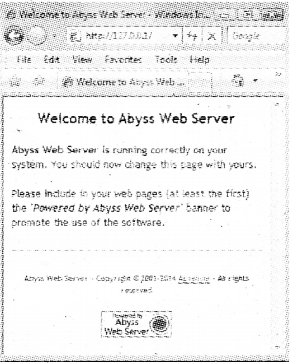
    After installing the web server type http://localhost in the address bar the following screen will be available.
    Plus Two Computer Science Notes Chapter 10 Server Side Scripting Using PHP 1

B) Writing and running the script

Take a note pad and type the code, PHP code should begin with <?php andend with ?>. Save this file in the root directory of the web server with extension php.

Step 1
Take a notepad and type (he following and save it as first.php on C:\Abyss Web ServeAhtdocs.
<?php
echO”My first PHP web page”;
?>

Step 2
Start the web server if it is off

Step 3
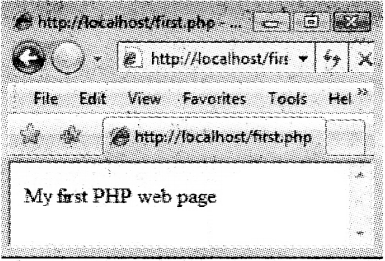
Type as “http://localhost/firstphp” in the address bar.
Plus Two Computer Science Notes Chapter 10 Server Side Scripting Using PHP 2

C) Combining HTML and PHP
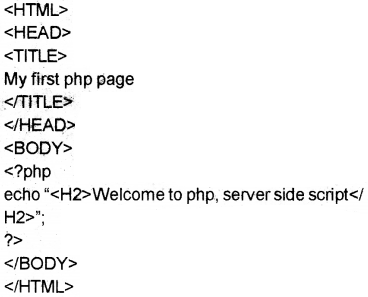
Both are closely related. We can write PHP code in between HTML code using <?php and ?>.
Eg:
Plus Two Computer Science Notes Chapter 10 Server Side Scripting Using PHP 3

D) Comments in PHP
We can make some text as a comment i.e. not as part of the program Single line(//) and multi line (starts with /* and ends with */)

<HTML>
<HEAD>
<TITLE>
My first php page </TITLE>
</HEAD>
<BODY>
<?php
/* This program is used to display a message “Welcome to php” */ echo “<H2>Welcome to php</H2>”; //shows a message?>
</BOD Y>
</HTML>

E) Output statements in PHP
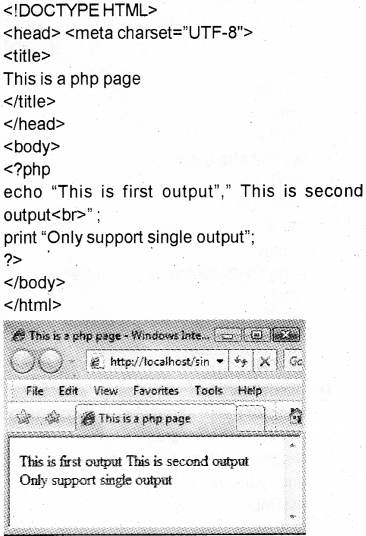
i) echo and print are used to display all types of data but echo is used to produce multiple outputs. Parenthesis is optional,

eg:
echo “ first output”, “second output”;
or
echo (“ first output”, “second output”);
print “only one output”;
or
print (“only one output”);
The difference between echo and print

Echo Print
Take more than one parameter Only one parameter
Does not return any value Returns TRUE or l on successful print and FALSE otherwise
Faster slower

Plus Two Computer Science Notes Chapter 10 Server Side Scripting Using PHP 5

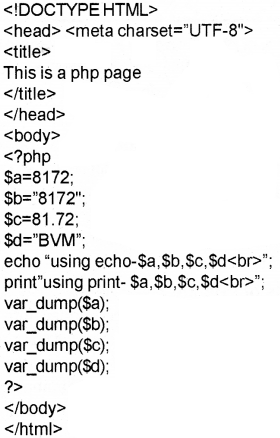
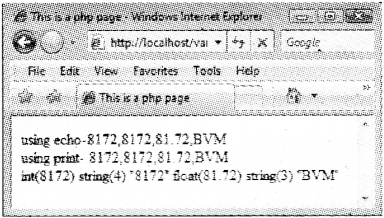
ii) var_dump()
This is used to display both data type and value of variables.
Syntax: var_dumpl(variablel, vanable2,etc…);

Eg:

Plus Two Computer Science Notes Chapter 10 Server Side Scripting Using PHP 6
Plus Two Computer Science Notes Chapter 10 Server Side Scripting Using PHP 7

Fundamentals of PHP

Variables

A variable name starts with $ symbol followed by the name of the variable. There is no need to declare a variable before using it. PHP automatically determines the data type based upon the value stored in it.
Syntax: $variable_name=value;

Rules for naming a variable in PHP

  • Begins with $ symbol followed by an alphabet or under score(a-zA-Zand _)
  • Digits(O-9)can be used after 2 characters.(Eg. $_1 ,$al ,$s12,etc)
  • Variable names are case sensitive.
  • Special characters cannot used except under score.

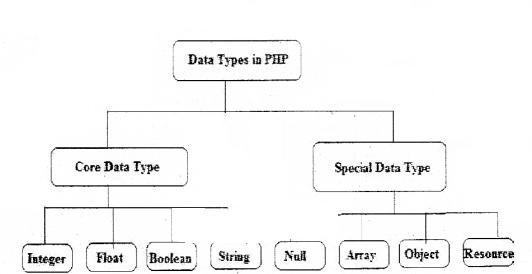
Data type

Plus Two Computer Science Notes Chapter 10 Server Side Scripting Using PHP 8

A) Core data types
Integer, Float/ Double and String, these data types are similar data types of C++. The size of integer or float is depending upon the OS.

  • Integer—Two types—ye and +ve.. PHPdoesnot support unsigned integer data type.
    Eg: 8172, -22, etc.
  • Float/ Double -:Numbers with decimal point.
    Eg: 81.72, 7E-1 0(7 * 1010 —Mantissa and Exponent method), 123E1 2(123*1012)
  • String: Combination of characters enclosed in quotes(single or double quotes) Eg: “BVM”,’HSS’, Computer Science’, etc.
  • Boolean: Used to store two values(states) TRUE or FALSE.
    Eg: values are yes/no, on/off, 1/0, true/false
    <?php
    Sx=false; Il assign the value FALSE to $x.
    $y=1; //assign the value TRUE to $y.

B) Special data types

  • Null-: Specialdata type with value NULL. This is the default value to a variable, if we do not set a value to it.
    $rn=null;
  • Array -: Array is a collection of elements. With the same name we can store many elements.
    Three types of array
    Indexed array-:
    Associated array-:
    Multi dimensional array-:
  • Object -; Similar in C++ and must be declared explicitly. At first a class is declared and then objects can be created using the command new.
  • Resources -: It is not an actual data type rather it is a special variable that hold references to file handler, data base object, etc.

Operators in PHP

Operators are the symbols used to perform an operation
a) Assignment operator(=)
The value of RHS is assigned to LHS variable. If $a=10 and $b=3 then $a=$b. This statement sets the value of $a and $b are same ,i.e. it sets a to 3.

b) Arithmetic operators
It is a binary operator. It is used to perform addition (+), subtraction(-), division(/), multiplication(*) ,modulus(%-givesthe remainder).
Eg. If $x=10 and $y=3then

$x+$y $x-$y $x*$y $x/$y $x%$y
13 7 30 3.333 1

c) Relational (Comparison) operators
It is used to perform comparison or relational operation between two values and returns either true or false.
Eg: If $X=10and $Y=3then

$X<$Y $X<=$Y $X>$Y $X>=$Y $X>==$Y $X!=$Y
false false true true false true

d) Logical operators
Here (and , &&), (or, ||), xorare binary operators and not(!) is a unary operator. It is used to combine relational operations and it gives either true or false
If $X=true and $Y=false then

$x && $x $X && $Y $Y && $X $Y &&$Y
true false False false

Both operands must be true to get a true value in the case of && operation If $X=true and $Y=false then

$X and $X $X and $Y $Y and $X $Y and $Y
true false False false

Both operands must be true to get a true value in the case of ‘and’ operation If $X=true and $Y=false then

$X || $X $X || $Y SY || $X $Y || $Y
true true true false

Either one of the operands must be true to get a true value in the case of || operation If $X=true and $Y=false then

$X or $X $X or $Y $Y or $X $Y or $Y
true true true false

Either one of the operands must be true to get a true value in the case of or operation If SX=true and $Y=false then

$X xor $X $X xor $Y $Y xor $X $Y xor $Y
true true true false

Either one of the operands must be true to get a true value in the case of xor operation If $X= true and $Y=false then

l$X !$Y
false true

e) String addition operator(‘.’, ‘.=’)
This is also called concatenation operator. It joins(concatenates) two strings and forms a string.
They are and ‘.=’.
Eg:
$x= “BVM HSS
$y= “ Kalparamba”;
$z=$x.$y;

  • Here the variable z becomes “BVM HSS Kalparamba”.
    $x.=$y;
  • Here the variable $x becomes “BVM HSS Kalparamba”.

f) Combined operators.
It is also called short hands
If $X=1O and $Y= 3 then

Arithmetic Assignment Expression Equivalent Arithmetic Expression The value of $X becomes
$X+=$Y $X=$X+$Y 13
$X-=$Y $X=$X-$Y 7
$X*=$Y $X=$X*$Y 30
$X/=$Y $X=$X/$Y 3.333
$X%=$Y $X=$X%$Y 1

g) Increment and decrement operators.
1) pre increment (++variable)
Eg:
lf$x=10then
echo(++$x); -> It prints 10+1=11

2) post increment (variable++)
lf $x=10then
echo($x++); -> It prints 10 itself.

3) pre decrement—variable)
lf $x=10then
echo(—$x); It prints 10-1=9

4) post decrement(variable—)
lf $x=10then
echo($x—);-> It prints 10 itself.

h) Escape sequences
It Is a character preceded by a back slash(\)

Operator Definition Example Output
\“ To print” echo TPHPr “PHP’
\’ To print1 echo”X\ian” X’ian
\n New line echo “BVM \nHSS” BVM HSS
\t To print tab echo”BVM\tHSS” BVM HSS
\r Print carriage return
\$ To prints echo”100\$” 100$
\\ To print \ echo”\\n is used as newline” \n is used as new line

Control Structures in PHP

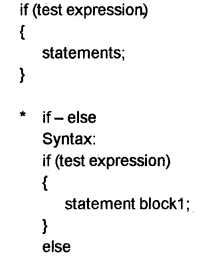
In general the execution of the program is sequential, we can change the normal execution by using the control structures.

simple if

Syntax:

Plus Two Computer Science Notes Chapter 10 Server Side Scripting Using PHP 9

Plus Two Computer Science Notes Chapter 10 Server Side Scripting Using PHP 10

The first expression evaluated and selects the statements with matched case value.

Loops in PHP

a) while loop
It is an entry controlled loop The syntax is given below
Loop variable initialised
while(expression)

{
Body of the loop;
Update loop variable;
}

b) do-while loop
This loop will execute at least once. The body of the loop will be executed until the expression becomes false,

do
{
Body of the loop;
Update loop variable;
}while(expression);

* for loop
The syntax of for loop is given below For(initialisation; testing; updation)

{
Body of the for loop;
}

continue and break in loops Continue is used to skip one iteration and continue the loop with next value. But break is used to terminate the execution of the current control structure such as for, for each, while, do while or switch.

Arrays in PHP

In PHP array is a collection of key and value pairs. Unlike C++, in PHP we can use either non negative integers or strings as keys.

Different types of arrays in PHP

  • Indexed arrays
  • Associate arrays
  • Multi dimensional arrays.

Indexed arrays-: The elements in an array can be distinguished as first or second or third etc. by the indices and the index of the first element is zero. In PHPthe function arrayO is used to create an array.
Syntax: $array_name=array(value1 ,value2, );
OR
$array_variable[key]=value;
Eg:$mark=array(60,70,80);
$course=amay(“Science”,”Commence”,”Humanities’);
OR
$mark[0]=60;
$mark[1]=70;
$mark[2]=80;
$course=”Science”;
$course=”Commerce”;
$course=”Humanities”;
Eg:
<!DOCTYPE HTML>
<html lang=”eii”>
<head>
<title>
We are learning PHP
</title>
</head>
<body bgcoior=”cyan”>
<?php
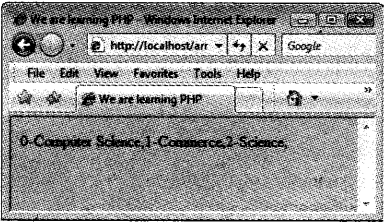
$course=amay(“Science”, “Commerce”,”Humanities’);
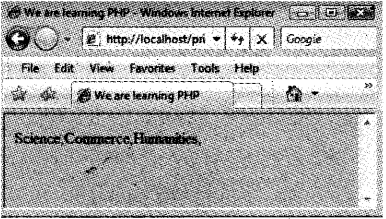
for($i=0;$i<3;$i++)
echo $course[$i].”,”;
?>
</body>
</html>
Plus Two Computer Science Notes Chapter 10 Server Side Scripting Using PHP 12

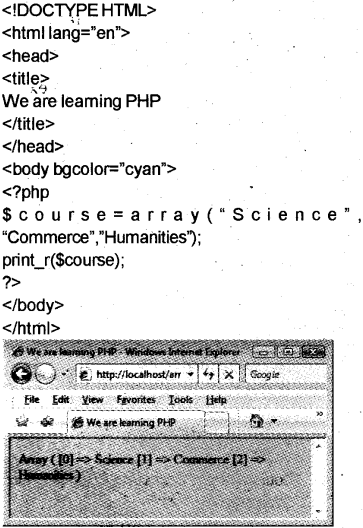
The function print_r can be used for printing an array.
Syntax: print_r(array_name);

Eg:
Plus Two Computer Science Notes Chapter 10 Server Side Scripting Using PHP 60

Associative arrays

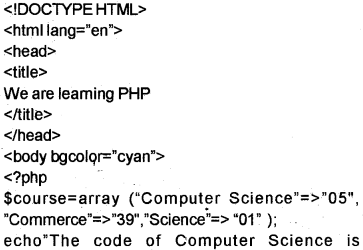
Arrays with named keys and string indices are called associative jarrays.
Syntax: $varibale_name=array(key1=>value1, key2=>value2,etc);

Eg:
Plus Two Computer Science Notes Chapter 10 Server Side Scripting Using PHP 15
Plus Two Computer Science Notes Chapter 10 Server Side Scripting Using PHP 16

for each loops (Extension of for loop)

The number of elements in an array is not known in advance foreach loop is used. Two types

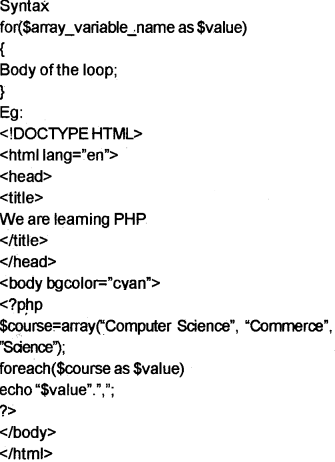
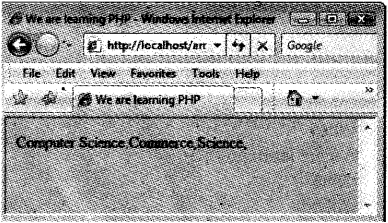
1) for ($array_variable_name as $value)
No need to specify the starting inde and ending index, the array pointer is moved one by one.
Plus Two Computer Science Notes Chapter 10 Server Side Scripting Using PHP 17
Plus Two Computer Science Notes Chapter 10 Server Side Scripting Using PHP 18

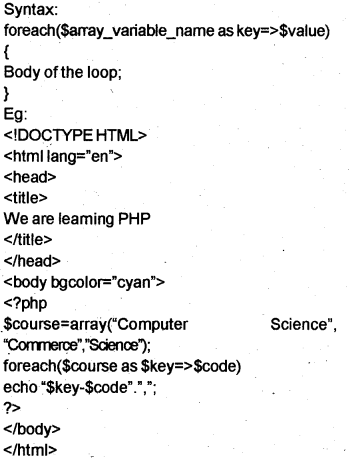
b) foreach($array_variable_name as key=> $value)
Here the value of the current array element is assigned to $value and the key is assigned to $key.
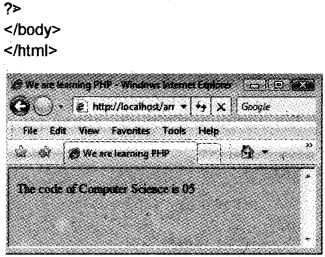
Plus Two Computer Science Notes Chapter 10 Server Side Scripting Using PHP 19
Plus Two Computer Science Notes Chapter 10 Server Side Scripting Using PHP 20

FunctionsinPHP

Two types user defined and built in functions.

User-defined functions

The key word function is used to declare a function in PHP.
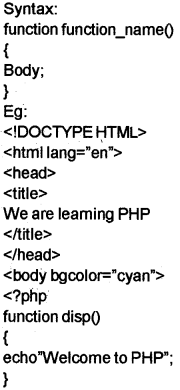
Plus Two Computer Science Notes Chapter 10 Server Side Scripting Using PHP 21
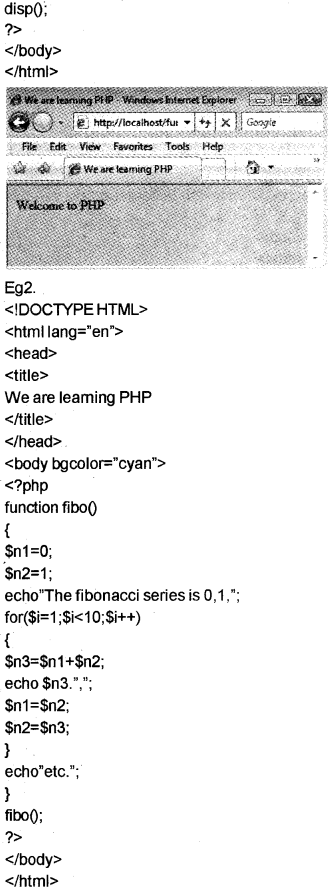
Plus Two Computer Science Notes Chapter 10 Server Side Scripting Using PHP 22
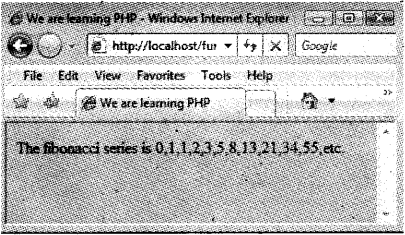
Plus Two Computer Science Notes Chapter 10 Server Side Scripting Using PHP 23

Built-in functions

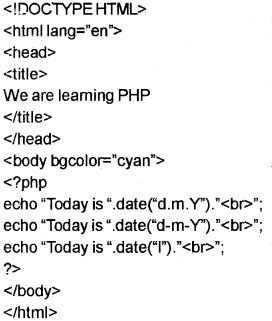
a) Date() -:Returns date and time.
Syntax: date(format[, timestamp]);

Format Purpose
d day of the month(0-31)
m month(1-12)
Y year
I day of the week(Eg.Monday)

Plus Two Computer Science Notes Chapter 10 Server Side Scripting Using PHP 24

b) String functions

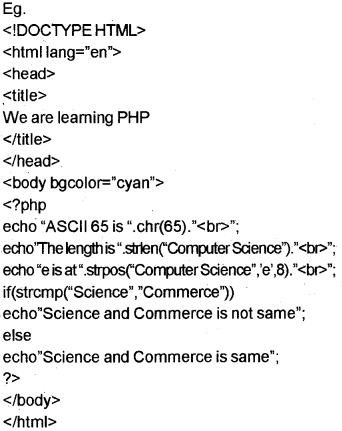
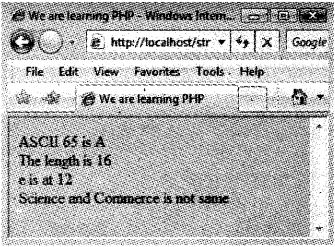
  • chr()-: Returns a character corresponding to the ASCI I. Eg. chr(ascii value);
  • strlen()- Returns the number of characters in a string strlen(string);
  • strops()- Returns the position of the first occurrence of a string inside another string. strpos(main string, substring, start position);
  • strcmp()- Compares two stings, strcm p(stri ng 1 ,stri ng2);

Plus Two Computer Science Notes Chapter 10 Server Side Scripting Using PHP 25
Plus Two Computer Science Notes Chapter 10 Server Side Scripting Using PHP 26

Three tier architecture in PHP

Tier 1 (Front end Tool): Browser/ Client uses HTML or HTML embedded with JavaScript.
Tier 2 (Middle end Tool)- Web Server(Apache /Microsoft IIS)
Tier 3 (Back end Tool)-Database(MySQL/Oracle) This means end user uses Browser(Tier 1) and send requests to the Web Server(Tier 2). The Web Server retrieves data from the Data Base(Tier 3). For this activities user interface, application programs, data storage etc are separated into layers(Tiers)

PHP forms

This is used to collect information from the client and send it to the Web Server by pressing the submit button. The server receives the data and collects the appropriate data from the data base and send it back as a response.

PHP global variables

A variable declared as global then it can be accessed from any where in the program.

  • Superglobal arrays : This is a special variable – available to all programs.
Superglobal Purpose
SGLOBALS Global scope variables available. .
$_SERVER Information about the server
$_GET Data passed using the HTTP GET method
$_POST Data passed using the HTTP POST method
$_REQUEST Data passed via HTTP request
$_FILES Data passed by an HTML file input
$_SESSION Current session data specific to the user
$_COOKIE Data stored on the browser.

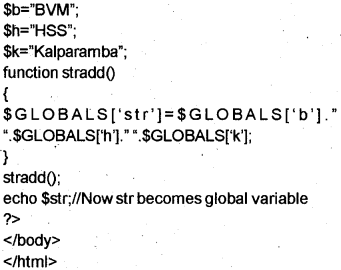
A) PHP$GLOBALS
PHP stores all global variables in an arräy calied $GLOBALS[index].
Index is the name of the variable.
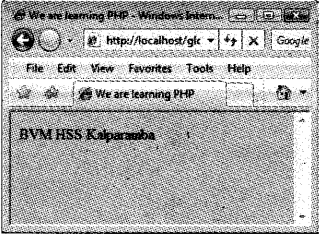
Plus Two Computer Science Notes Chapter 10 Server Side Scripting Using PHP 27
Plus Two Computer Science Notes Chapter 10 Server Side Scripting Using PHP 28
Plus Two Computer Science Notes Chapter 10 Server Side Scripting Using PHP 29

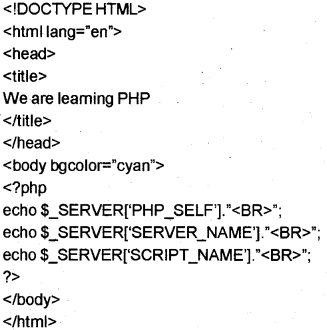
B) PHP $_SERVER
This returns the paths and script locations.

Code Description
$_SERVER [‘PHP_SELF] Returns the currently executing file name
$_SERVER [‘SERVER_NAME’] Returns the host server name
$_SERVER [‘SCRIPT_NAME’] same as $_SERVER[‘PHP_SELF’]

Plus Two Computer Science Notes Chapter 10 Server Side Scripting Using PHP 30
Plus Two Computer Science Notes Chapter 10 Server Side Scripting Using PHP 31

C) PHP $_REQUEST
When a user click a submit button, $_REQUEST gathers all data. $_REQUEST is an array that contains $_GET, $_POST and $_cookie superglobals.

D) PHP $_POST
When the user presses the submit button and the method=post then the data is passed to the server and we can access the data by using the variable $_POST[‘variable name’];

E) PHP S_GET
When the user presses the submit button and the method=get then the data is passed to the seÑer and we can access the data by using the variable $_GET[’vanable namel;

GET and POST comparison

The difference between GET and POST method is given below.

Get method Post method
1. Faster 1. Slower
2. To send small volume of data. 2. To send large volume of data
3. Up to 2000 characters 3. No limit
4. Less secure 4. More secure
5. Data visible during submission 5. Data not visible during submission
6. Page link can be book marked 6. Page link can never be book marked.

Connecting PHP to database(MySQL)

Establishing connection to MySQL database

To access data from the data base, the PHP program first establish a connection to the data base server(MySQL) and then specify the data base to use.Consider the following

  • Open a connection to MySQL.
  • Secify the data base we want to open.
  • Retrieve data from or insert data in to dat base.
  • Close the connection.

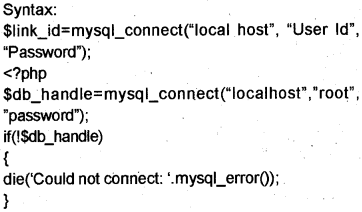
Step 1
Open a connection to MySQL
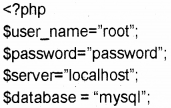
For this rnysql_connect function is used. A link identifier is returned when connected successfully otherwise a NULL value.
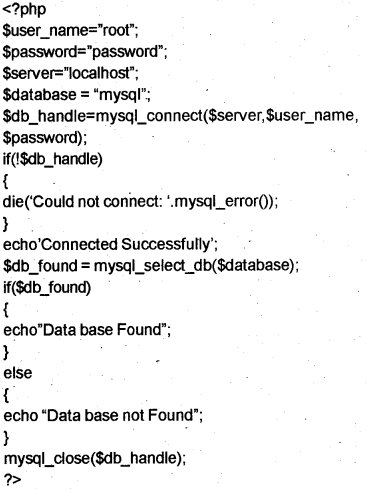
Plus Two Computer Science Notes Chapter 10 Server Side Scripting Using PHP 32
echo connected Successfully’;
mysql_dose($dbhandle);
?>

Note : In the above specify the password you given in MVSQL installation.

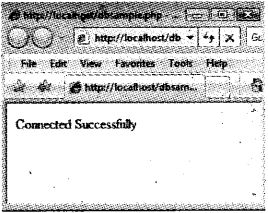
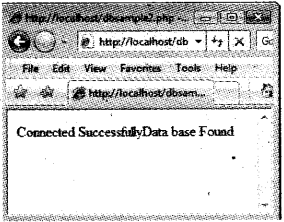
The out put is as given below.
Plus Two Computer Science Notes Chapter 10 Server Side Scripting Using PHP 33

Step 2
Specify the data base you want to open
MySQL server may contain many data bases. mysql_select_db() is a function used to select particular data base. It return true if it finds the data base otherwise false.
Syntax: mysql_select_db($database);

Eg:
Plus Two Computer Science Notes Chapter 10 Server Side Scripting Using PHP 34
Plus Two Computer Science Notes Chapter 10 Server Side Scripting Using PHP 35

Step 3
Reading data from data base
Two steps

a) Execute the SQL query on the data base using the function mysql_query()
Syntax:
$result_set=mysql_query(query,connection);

b) Insert a row using the function mysql_fetch_array()
Sresult_set=mysql_query(query, connection);
$fetched_row=mysql_fetch_array($result_set);

Example 1 :
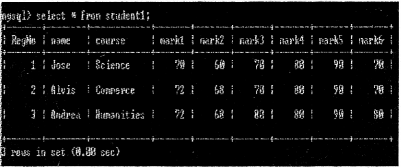
Let us do the following program The structure of a table is given to store the details of marks scored by students in an exam

Data Type Description
RegNo Numeric Unique
name char upto 30 characters
course char
marks of 6 subjects numeric six separate columns

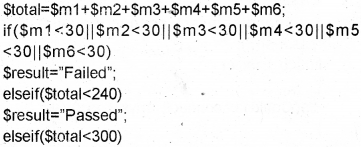
Write SQL statements for the creation of the table and the following requirements.

Step 1.
For this take MySQL and do the following
Plus Two Computer Science Notes Chapter 10 Server Side Scripting Using PHP 36

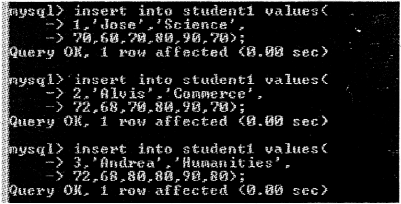
a) Insert data into the fields(min 3 records)
Plus Two Computer Science Notes Chapter 10 Server Side Scripting Using PHP 37

b) Display the details of all students.
Plus Two Computer Science Notes Chapter 10 Server Side Scripting Using PHP 38

Step 2:
Take a notepad and type the following then save it asform1.html

<html>
<body>
<form method-’post” action=”dbsample3.php”>
<center>RegisterNo:
<inputtype=”text” name=”regno”><br>
<input type=”submit” value=”Show Result”>
</center>
</form>
</body>
</html>

Step 3.
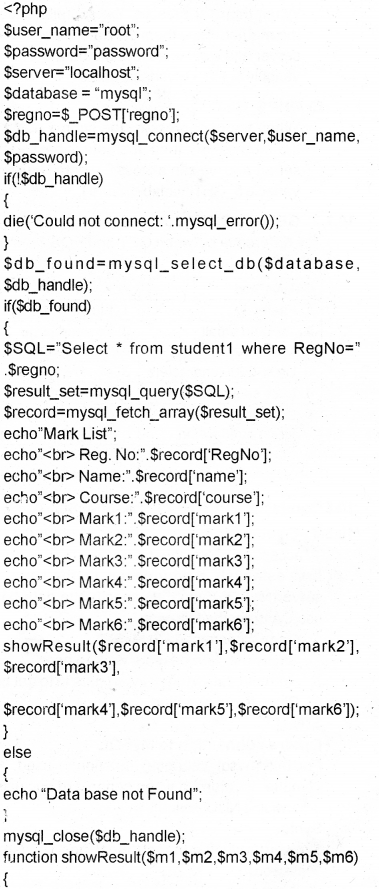
Take another notepad then type the following and save itasdbsampleS.php
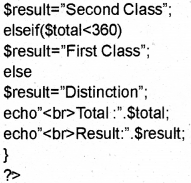
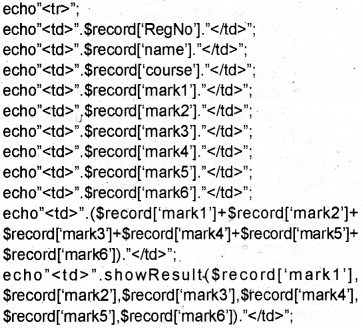
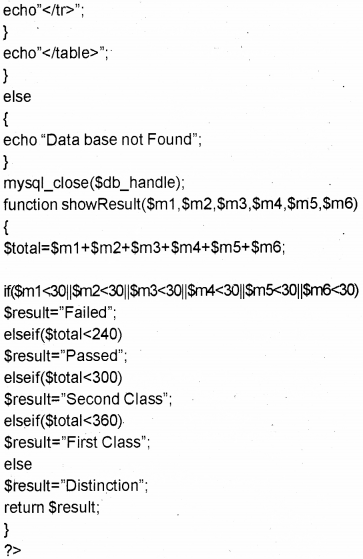
Plus Two Computer Science Notes Chapter 10 Server Side Scripting Using PHP 41
Plus Two Computer Science Notes Chapter 10 Server Side Scripting Using PHP 42
Plus Two Computer Science Notes Chapter 10 Server Side Scripting Using PHP 43

Step 4.
Run the file forml .html and do the following
Plus Two Computer Science Notes Chapter 10 Server Side Scripting Using PHP 44

Example 2

Step 1.
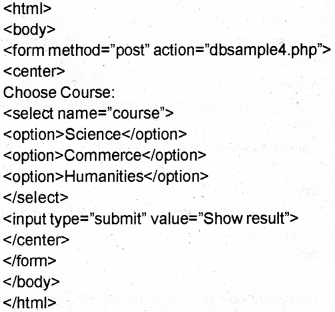
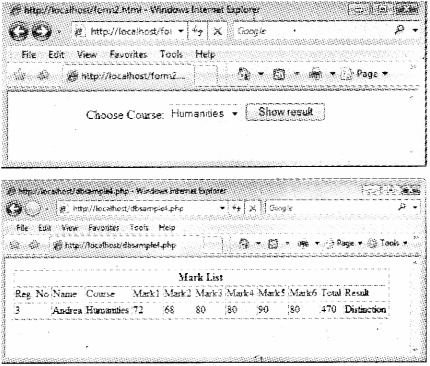
Take a notepad and type the following. Save it as form2.html.
Plus Two Computer Science Notes Chapter 10 Server Side Scripting Using PHP 45

Step 2
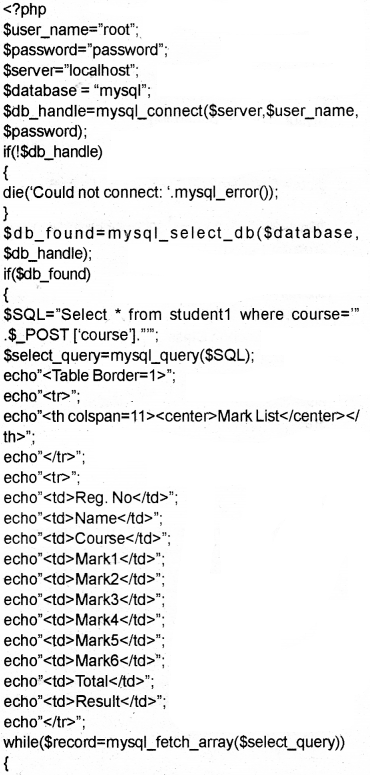
Take another notepad then type the following and save it as dbsample4.php
Plus Two Computer Science Notes Chapter 10 Server Side Scripting Using PHP 46
Plus Two Computer Science Notes Chapter 10 Server Side Scripting Using PHP 47
Plus Two Computer Science Notes Chapter 10 Server Side Scripting Using PHP 48

Step 3.
Run the file form2.html and do the following
Plus Two Computer Science Notes Chapter 10 Server Side Scripting Using PHP 49

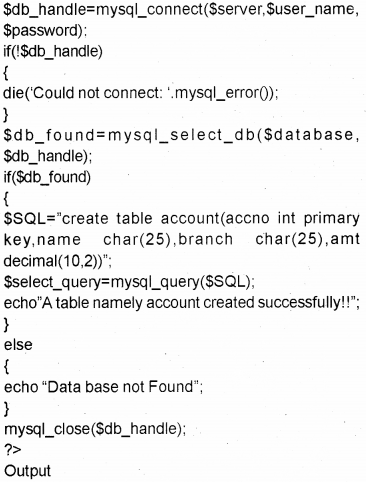
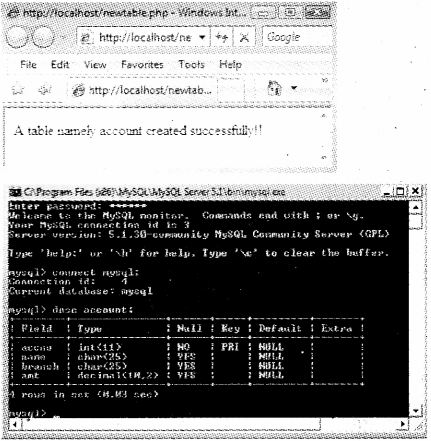
Creating a new table using PHP

It is possible to create a new table using PHP.
Syntax: $SQL=”create table <table name> (column_name1 data type constraint,etc)”; $select_query=mysql_query($SQL);

Eg:
Plus Two Computer Science Notes Chapter 10 Server Side Scripting Using PHP 50
Plus Two Computer Science Notes Chapter 10 Server Side Scripting Using PHP 51
Plus Two Computer Science Notes Chapter 10 Server Side Scripting Using PHP 52

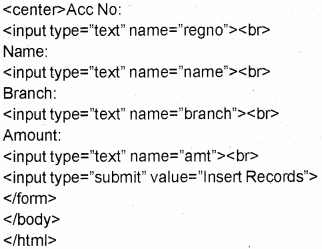
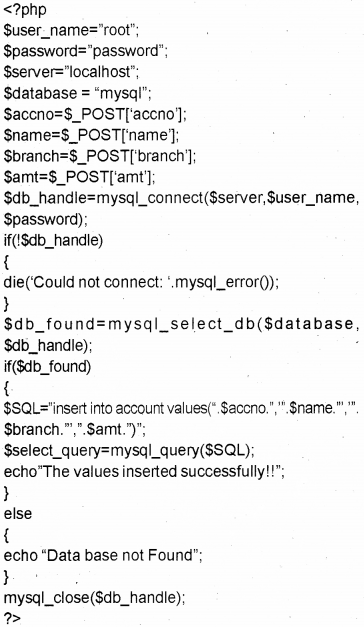
Inserting data into a table using PHP

It is also possible to insert values in to a table using PHP program

Syntax:
$SQL=”insert into <table name> values (valuel, value2,…);
$select_query=mysql_query($SQL);

Ex:
Step 1.
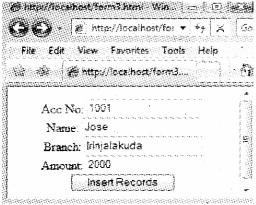
Take a notepad .then type the following and save it asform3.html
<html>
<body>
<form method-’post” action-’table2.php”>
Plus Two Computer Science Notes Chapter 10 Server Side Scripting Using PHP 54

Step 2.
Take another notepad and type the following then save it as table2.php.
Plus Two Computer Science Notes Chapter 10 Server Side Scripting Using PHP 55

Step 3.
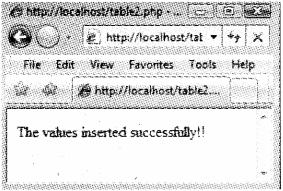
Run the file form3.html and do the following
Plus Two Computer Science Notes Chapter 10 Server Side Scripting Using PHP 56
Plus Two Computer Science Notes Chapter 10 Server Side Scripting Using PHP 57

Updating data in a table using PHP

It is also possible to change or update values in a row by using PHP.
$SQL=”Update ctable_name> set ccolumn_name>= new_value where condition.
$select_query=mysql_query($SQL);

Ex:
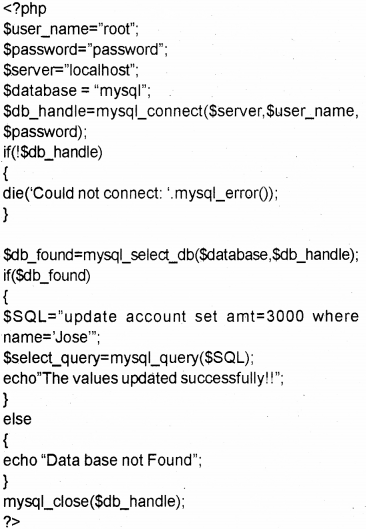
If you want to change the amount deposited by Jose from 2000 to 3000. Do the following.

Step 1.
Take a notepad, then type the following and save it asform3.html
Plus Two Computer Science Notes Chapter 10 Server Side Scripting Using PHP 58
Plus Two Computer Science Notes Chapter 10 Server Side Scripting Using PHP 59

Plus Two Computer Science Notes Chapter 9 Structured Query Language

Kerala State Board New Syllabus Plus Two Computer Science Notes Chapter 9 Structured Query Language.

Kerala Plus Two Computer Science Notes Chapter 9 Structured Query Language

SQL – Structured Query Language developed at IBM’s San Jose Research Lab.

The result of the compilation of DDL statements is a set of tables, which are stored in a special file called a data dictionary.

Creating a database in Mysql CREATE DATABASE <database_name>;
Eg:
mysql>CREATE DATABASE BVM;

Opening a database
USE command used to use a database
USE <database_name>;
Eg:
mysql>USE BVM;
The SHOW command is used to list the entire database in our system.
mysql>SHOW DATABASES;

Data Types

  • Char – It is used to store a fixed number of characters. It is declared as char(size).
  • Varchar – It is used to store characters but it uses only enough memory.
  • Dec or Decimal – It is used to store numbers
    with decimal points. It is declared as Dec (size, scale). We can store a total of size number of digits. .
  • Int or Integer- It is used to store numbers with¬out decimal point. It is declared as int. It has no argument. Eg: age int.
  • Smallest – Used to store small integers.
  • Date – It is used to store date. The format is yyyy- mm-dd. Eg: ‘1977-05-28’!
  • Time – It is used to store time. The format is

DDL commands (3 commands)

  • Create table
  • Alter table
  • Drop table

DML commands (4 commands)

  • Select
  • Insert
  • Delete
  • Update

DCL (Data Control Language) commands

1. Grant
2. Revoke

Rules for naming tables and columns

  • The name may contain alphabets(A-Z, a-z),digits(0-9), underscore (J and dollar ($) symbol
  • The name must contain at least one character.
  • Special characters cannot be used except _ and $
  • Cannot be a keyword
  • The name must be unique.

Constraints are used to ensure database integrity.

  • Not Null
  • Unique
  • Primary key
  • Default
  • Autojncrement

Order By:
Used to sort rows either in ascending (asc) or descending (desc) order.

Aggregate functions

  • Sum()- find the total of a column.
  • Avg()-find the average of a column.
  • Min()- find the smallest value of a column.
  • Max() – find the largest value of the column.
  • Count()-find the number of values in a column.

Group by clause is used to group the rows. Having clause is used with Group By to give conditions.


Plus Two Computer Science Notes Chapter 8 Database Management System

Kerala State Board New Syllabus Plus Two Computer Science Notes Chapter 8 Database Management System.

Kerala Plus Two Computer Science Notes Chapter 8 Database Management System

DBMS means Data Base Management System. It is a fool used to store a large volume of data, retrieve and modify the data as and when required. DBMS consists of data and programs.

Advantages of DBMS

  • Data Redundancy
  • Inconsistency can be avoided
  • Data can be shared
  • Standards can be enforced
  • Security restrictions can be applied
  • Integrity can be maintained
  • Efficient data access
  • Crash recovery

Structure of DBMS

  • Fields – Smallest unit of data. Eg: Name, age, sex, …
  • Record – Collection of related fields.
  • File- Collection of records

Components of DBMS

a) Databases – It is the main component.
b) Data Definition Language (DDL) It is used to define the structure of a table.
c) Data Manipulation Language (DML) – It is used to add, retrieve, modify and delete records in a database.
d) Users – With the help of programs users interact with the DBMS.

Database Abstraction

  • Abstraction means hiding, it hides certain details of how data is stored and maintained.

Levels of Database Abstraction

  • Physical Level (Lowest Level) – It describes how the data is actually stored in the storage medium.
  • Logical Level (Next Higher Level) – It de¬scribes what data are stored in the database.
  • View Level (Highest level) – It is closest to the users. It is concerned with the way in which the individual users view the data.

Data Independence

It is the ability to modify the scheme definition in one level without affecting the scheme definition at the next higher level.

a) Physical Data Independence – It is the ability to modify the physical scheme without causing application programs to be rewritten.

b) Logical Data Independence – It is the ability to modify the logical scheme without causing ap-plication programs to be rewritten.

Users of Database

  • Database Administrator
  • Application Programmer
  • Naive users

Data models – It is a collection of tools for describ¬ing data, data relationships, data semantics, and consistency problem. 3 models.

  • Hierarchical model
  • Network model
  • Relational model

RDBMS – Relational Data Base Management System. It consists of a collection of relations as a database.

  • Relation means table.
  • Domain – A pool of possible values from which col¬umn values are drawn.
  • Tuple means rows.
  • Attributes means columns. ,
  • Cardinality – The number of rows.
  • Degree -The number of columns
  • View- A view is a virtual table derived from one or more base tables.
  • Key is used to identify or distinguish a tuple in a relation.
  • Candidate key- It is used to uniquely identify the row.
  • Primary key – It is a set of one or more attributes used to uniquely identify a row.
  • Alternate key -A candidate key other than the primary key.
  • Foreign key- A single attribute or a set of attributes, which is a candidate key in another table is called a foreign key.
  • Relational Algebra – It consists of a set of operations that takes one or two relations as input and produces a new relationship as a result.
    • Select operation (σ)
    • Project Operation (π)
    • Cartesian Product (-)
    • Union Operation (∪)
    • Intersection operation (∩)
    • Set difference operation (-)

Plus Two Computer Science Notes Chapter 7 Web Hosting

Kerala State Board New Syllabus Plus Two Computer Science Notes Chapter 7 Web Hosting.

Kerala Plus Two Computer Science Notes Chapter 7 Web Hosting

Web hosting

Buying or renting storage space to store website in a web server and provide service(made available 24×7) to all the computers connected to the Internet. This is called web hosting. Such service providing companies are called web hosts. Programming languages used are PHP, ASP.NET, JSP.NET, etc.

Types of web hosting

Various types of web hosting services are available. We can choose the web hosting services according to our needs depends upon the storage space needed for hosting, the number of visitors expected to visit, etc.

  • Shared Hosting
  • Dedicated Hosting
  • Virtual Private Server (VPS)

Buying hosting space

We designed a website of our school and we decide our school website to be made available to all over the world, we have to place the website files on a web server for that we have to purchase hosting space(memory space) in a web server.

Following factors to be considered

  • Buying sufficient amount of memory space for storing ourwebsite files
  • If the web pages contain programming contents supporting technology must be consider
  • Based upon the programs select Windows hosting or Linux hosting

Domain Name System(DNS) Registration

Millions of websites are available over the Internet so that our website must be registered with a suitable name. Domain Name registration is used to identify a website over Internet. A domain name must be unique(i.e. no two website with same name is available). So you have to check the availability of domain name before you register it, for this www.whois.net website will help. If the domain name entered is available then we can register it by paying the Annual registration fees through online.

FTP (File Transfer Protocol) client software

When a client requests a website by entering website address. Then FTP client software helps to establish a connection between client computer and remote server computer. Unauthorised access is denied by using username and password hence secure our website files for that SSH(Secure Shell) FTP simply SFTP is used. Instead of http://, it uses ftp://.

By using FTP client s/w we can transfer(upload) the files from our computer to the web server by usrng the ‘drag and drop’ method. The popular FTP client software are FileZilla, CuteFTP, SmartFTP, etc.

Free hosting

The name implies it is free of cost service and the expense is meet by the advertisements. Some service providers allow limited facility such as limited storage space, ,do not £llow multimedia(audio and video) files.

A paid service website’s address is as follows
eg: www.bvmhsskalparamba.com

Usually two types of free web hosting services as follows
1) as a directory service.
Service provider’s website address/ our website address
eg: www.facebook.com / bvm hss kalparambu

2) as a Sub domain
Our website address.service providers website address
eg: bvmhsskalparamba.facebook.com
Earlier web hosting services are expensive but nowadays it is cheaper hence reduced the need for free web hosting.

Example for free web hosting.
Plus Two Computer Science Notes Chapter 7 Web Hosting 1

Content Management System(CMS)

Do you heard about Data Base Management System(DBMS). DBMS is a software(collection of programs) used to create, alter, modify, delete and retrieve records of a Data Base. Similarly CMS is a collection of programs that is used to create, modify, update and publish website contents. CMS can be downloaded freely and is useful to design and manage attractive and interactive websites with the help of templates that are available in CMS. WordPress, j’oomla, etc are the examples of CMS.

Responsive web design

The home page is displayed differently according to the screen size of the browser window(different screen sized devices-mobile phone, palm top, tablet, lap top and desk top) we used. The website is designed dynamically(flexibly) that suit the screen size of different device introduced by Ethan Marcotte. Before this, companies have to design different websites for different screen sized devices. By responsive web design, companies have to design only one website that suitably displayed according to the screen size of the devices.

It is implemented by using flexible grid layout, images and media queries

  • Flexible grid layouts : It helps to set the size of the web page to fit the screen size of the device.
  • Flexible image and video : It helps to set the image or video dimension to fit the screen size of the device.
  • Media queries : There is an option(settings) to select the size of the web page to match our device, this can be done by using media queries inside the CSS file.

A well known Malayalam daily Malayala Manorama launched their responsive website.

Plus Two Computer Science Notes Chapter 6 Client-Side Scripting Using JavaScript

Kerala State Board New Syllabus Plus Two Computer Science Notes Chapter 6 Client-Side Scripting Using JavaScript.

Kerala Plus Two Computer Science Notes Chapter 6 Client-Side Scripting Using JavaScript

JavaScript(Original name was Mocha) was developed by Brendan Eich for the Netscape Navigator browser later all the browsers support this.

Getting Started With Javascript

  • Scripts are small programs embedded in the HTML pages, to write scripts <SCRIPT> tag is used.

Two types of scripts

1. Client scripts -These are scripts executed by the browser(client) hence reduces network traffic and workload on the server.

2. Server scripts – These are scripts executed by the server and the results as a webpage returned to the client browser.

  • The languages that are used to write scripts are known as scripting languages. Eg: VB Script, Javascript etc.
  • Javascript and VB Script are the two client-side scripting languages.
  • Java script(developed by Brendan Eich for the Netscape browser) is a platform-independent scripting language. Means It does not require a particular browser. That is it runs on any browser hence it is mostly accepted scripting language. But VB Script(developed by Microsoft) is a platform-dependent scripting language. Means it requires a particular browser(MS Internet Explorer) to work which is why it is not widely accepted scripting language.
  • Attribute makes the tags meaningful Language attribute specifies the name of the scripting language used.
    Example:
    <SCRIPT Language=” JavaSCript”>
    </SCRIPT>
  • The identifiers are case sensitive (means Name and NAME both are treated as different)
  • CamelCase : An identifier does not use special characters such as space hence a single word is .formed using multiple words. Such a naming method is called CamelCase(without space between words and all the words first character is in upper case letter). These are two types

1) UpperCamelCase -. when the first character of each word is capitalised, Eg. Date Of Birth, JoinTime,etc
2) lowerCamelCase: when the first character of each word except the first word is capitalised. Eg. date of birth, join time, etc,…

  • To write anything on the screen the following function is used document.write(string);
    eg. document.write(“Welcome to BVM HSS, Kalparamba”);
    Note : Like C++ each and every statement in javascript must be end with semicolon(;).
  • To create a web page using javascript
  • <HTML>
    <HEAD><TITLE>JAVASCRIPT- WELCOMED TITLE></HEAD>
    <BODY>
    <SCRIPT Language=”JavaScript”>
    document.write(“welcome to my first javascript page”);
    </SCRIPT>
    </BODY>
    </HTML>
    Its output is as follows
    Plus Two Computer Science Notes Chapter 6 Client-Side Scripting Using JavaScript 1

Creating Functions In Javascript

  • Function : Group of instructions(codes) with a name, declared once can be executed any number of times. There are two types 1) built in and 2)user defined
  • To declare a function, the keyword function is used.
  • A function contains a function header and function body
  • Even though a function is defined within the body section, it will not be executed, if it is not called. Syntax: function <function name>()
{
Body of the function;
}
Eg: function print()
{
document.writefWelcometo JS”);
}
  • Here the function is the keyword.
  • the print is the name of the user-defined function
  • To execute(call) the above function namely print do as follows,
print();
Eg:
<HTML>
<HEAD><TITLE>JAVASCRIPT- functionc</ TITLE></HEAD>
<SCRIPT Language ”JavaScript”>
function print()
{
document.write(“welcome to my first javascript page using print function”);
}
</SCRIPT>
<BODY>
<SCRIPT Language*’JavaScript”> printO;
</SCRIPT>
</BODY>
</HTML>
Plus Two Computer Science Notes Chapter 6 Client-Side Scripting Using JavaScript 2

Datatypes In Javascript

Unlike C++ it uses only three basic data types

  1. Number: Any number(whole or fractional) with or without sign.
    Eg:+1977,-38.0003,-100,3.14157,etc
  2. String: It is a combination of characters enclosed within double quotes.
    Eg: “BVM”, “jobi_cg@rediffmail.com”, etc
  3. Boolean : We can store either true or false.lt is case sensitive. That means can’t use TRUE OR FALSE

Variables In Javascript

For storing values you have to declare a variable, for that the keyword var is used. There is no need to specify the data type.
Syntax:
var<variable name1> [, <variable name2>, <variable name3>,etc…]
Here square bracket indicates optional.
Eg: varx,y,z;
x= 11;
y = “BVM”;
z = false; .

Here x is of number type, y is of string and z is of Boolean type.

typeof(): this function is used to return the data type, undefined : It is a special data type to represent variables that are not defined using var.

Operators In Javascript

  • Operators are the symbols used to perform an operation

Arithmetic operators

It is a binary operator. It is used to perform addition(+), subtraction^), division^, multiplication(*), modulus (%-gives the remainder) ,increment(++) and decrement—Operations.
Eg.
If x=10 and y=3 then

x+y x-y x*y x/y x%y
13 7 30 3.333 1

ifx=10then
document.write(++x); -> It prints 10+1=11 lfx=10then
document.write(x++); -> It prints 10 itself. Ifx=10then
document.write(—x); It prints 10-1=9 lfx=10then
document.write(x—);-> It prints 10 itself.

Assignment operators

If a = 10 and b = 3 then a = b. This statement sets the value of a and b are same, i.e. it sets a to 3.
It is also called short hands
lf X = 10 and Y = 3 then

Arithmetic Assignment Expression Equivalent Arithmetic Expression The value of X becomes
X+=Y X=X+Y 13
X-=Y X=X-Y 7
X*=Y X=X*Y 30
X/=Y X=X/Y 3.333
X%=Y X=X%Y 1

Relational(Comparison) operators

It is used to perform comparison or relational operation between two values and returns eithertrue orfalse.
Eg:
lf X = 10 and Y = 3 then

X<Y X<=Y X>Y X>=Y X==< X!=Y
false false true true false true

Logical operators

Here AND(&&), OR(||) are binary operators and NOT(!) is a unary operator. It is used to combine relational operations and it gives either true or false If X=true and Y=false then

X&&X X&&Y Y&&X Y&& Y
true false False false

Both operands must be true to get a true value in the case of AND(&&) operation If X=true and Y=false then

X || X X || Y Y || X Y || Y
true true true false

Either one of the operands must be true to get a true value in the case of OR(||) operation
If X= true and Y=false then

IX !Y
false true

String addition operator(+)

This is also called concatenation operator. It joins(concatenates) two strings and forms a string.
Eg:
var x,y,z;
x = “BVM HSS
y = “Kalparamba”;
z = x+y;

  • Here the variable z becomes “BVM HSS Kalparamba”.

Note: If both the operands are numbers then addition operator(+) produces number as a result otherwise it produces string as a result. Consider the following.

Operand 1 data type Operand 2 data type Operation Resultant data type
number number +(addition) number
number siring string
string number string
string string string

Eg:

  • 8(number) + 3(number)=11 (Result is a number)
  • 8 (number)+“3”( string) = “83” (Result is a string)
  • “8” (string) + 3 (number) = “83”(Result is a string)
  • “8” (string) + “3″ (string) = “83” (Result is a string)

Control Structures In Javascript

In general the execution of the program is sequential, we can change the normal execution by using the control structures.

Simple if

Syntax:

if(test expression)
{
statements;
}

First the test expression is evaluated, if it is true then the statement block will be executed otherwise not.

if - else
Syntax:
if (test expression)
{
statement blockl;
}
else
{
statement block2;
}

First the test expression is evaluated, if it is true then the statement blockl will be executed other wise statement block2 will be evaluated.

Switch
It is a multiple branch statement. Its syntax is given below.
switch(expression)

{
case value1: statements;break;
case value2: statements;break;
case value3: statements;break;
case value4: statements;break;
case value5: statements;break;
.............
default : statements;
}

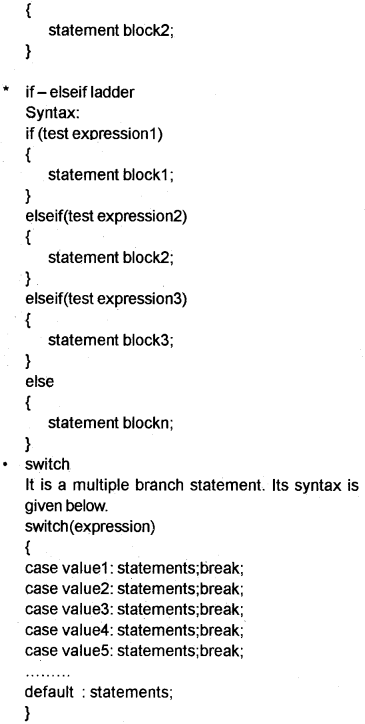
First expression evaluated and selects the statements with matched case value.

for loop

The syntax of for loop is given below For(initialisation; testing; updation)

{
Body of the for loop;
}

while loop

It is an entry controlled loop The syntax is given below
Loop variable initialised
while(expression)

{
Body of the loop;
Update loop variable;
}

Here the loop variable must be initialised out side the while loop. Then the expression is evaluated if it is true then only the body of the loop will be executed and the loop variable must be updated inside the body. The body of the loop will be executed until the expression becomes false.

Built In Functions (Methods)

1) alert() : This is used to display a message (dialogue box) on the screen.
eg: alert(“Welcome to JS”);

2) isNaN() : To check whether the given value is a number or not. It returns a Boolean value. If the value is not a numberfNaN) then this function returns a true value otherwise it returns a false value.
Eg.

  • isNaN(“BVM”); returns true
  • isNaN(8172); returns false
  • isNaN(“680121 ”); returns false
  • alert(isNaN(8172); displays a message box as false

3. toUpperCase() : This is used to convert the text to upper case.
Eg;
varx=”bvm”;
alert(x.toUpperCase());

4. toLowerCase() This is used to convert the text to lower case.
Eg:
varx-‘BVM”;
alert(x.toLowerCase());

5. charAt() : It returns the character at a particular position.
Syntax: variable.charAt(index);
The index of first character is 0 and the second is 1 and so on.
Eg:
varx-’HIGHER SECONDARY”;
alert(x.charAt(4));

Eg 2.
varx=”HIGHER SECONDARY”;
alert(“The characters @ first position is “+x.charAt(0));

6. length property : It returns the number of characters in a string.
Syntax: variable.length;
Eg.
varx=”HIGHER SECONDARY”;
alert (“The number of characters is “+ x.length);
Output is as follows(note that space is a character)

Accessing Values In A Textbox Using Javascript.

Name attribute of FORM, INPUT, etc is very important for accessing the values in a textbox.

Consider the following program to read a number and display it

<HTML>
<HEAD><TITLE>JAVASCRIPT- read a value from the console</TITLE>
<SCRIPT Language=”JavaScript”>
function print()
{
varnum;
num=document.frmprint.txtprint. value;
document.write(“The number you entered is “ + num);
}
</SCRIPT>
</HEAD>
<BODY>
<FORM Name="frmprint">
<CENTER>
Enter a number
<INPUTType="text" name="txtprint">
<INPUT Type="button" value="Show" onClick= "printO">
</CENTER>
</FORM>
</BODY>
</HTML>

In the above code,

  • print() is the user defined function.
  • onClick is an event(lt is a user action). The function print() is executed when the user clicks the show button. Here code is executed as a response to an event.
  • frmprint is the name of the form.
  • txtprint is the name of the text.

Ways To Add Scripts To A Web Page.

Inside <BODY> section

  • Scripts can be placed inside the <BODY> section.

Inside <HEAD> section

  • Scripts can be placed inside the <HEAD> section. This method is widely accepted method

External (another) JavaScript file

We can write scripts in a file and save it as a separate file with the extension .js. The advantage is that this file can be used across multiple HTML files and can enhance the speed of page loading.

Plus Two Computer Science Notes Chapter 5 Web Designing Using HTML

Kerala State Board New Syllabus Plus Two Computer Science Notes Chapter 5 Web Designing Using HTML.

Kerala Plus Two Computer Science Notes Chapter 5 Web Designing Using HTML

3 types of Lists in HTML

  1. Unordered List (<UL>) – Items are displayed with square, circle or disc in front
  2. Ordered List (<OL>) – Items are displayed with the following type values.
    Type = 1 for 1,2, 3, ………..
    Type = i for i, ii, iii, ………..
    Type = I for I, II, III, ………..
    Type = a for a, b, c, ………..
    Type =Afor A,B,C, ………..
  3. Definition List (<DL>) – It is formed by definitions.
    • <L/> – It is used to specify List items.
    • <DT> – It is used to specify Definition Term.
    • <DD> – Used to specify the description
    • <A> is used to provide hyperlinks. Two types of linking. Its attribute is HREF.

1) External link – Used to connect 2 different web . pages.
2) Internal link – Used to connect different locations of same page.

Concept of URL

URL means uniform Resource Locator.
Two type of URL
a) Relative URL – Here we explicitly give the web site address
Eg: <Ahref=http://www.hscap.kerala.gov.in>

b) Absolute URL – Here we implicitly give the web site address. The path is not specified here.
Eg: Consider the web pages index.html and school.htmi saved in the folder C:\BVM. The file indexs.html contains the following.

<A href=”school.htmr>. Here we did not specify the full path of the file school.html. But this implicitly points to the file stored in C:\BVM

Creating Graphical hyperlinks

It can be achieved by using the <img> tag inside the <a>tag.
Eg:
<A href=”school.html”><img src=”school.jpg”></A>

Creating E- mail linking
It can be achieved by using the key word mailto as a value to href attribute
Eg:
<A href=mailto:”info@spark.gov.in”> SPARK</A>

  • Insert music and videos
  • <embed> tag is used to add music or video to

Attributes

  • src- specifies the file to play
  • width – Specifies the width of the player
  • height-Specifies the height of the player
  • hidden – Used to specifies the player is visible or not
  • <noembed> – Used to specifies an alternate when the browser does not support the <embed> tag.

Attribute

  • src-Used to specify the image file
  • alt – Used to specify the alternate text Eg:
    <html>
    <head>
    </head>
    <body>
    Here is a tag embed to play music
    <embed src=”c:\alvis.wma” width=”500″ height=”500″ hidden=”true”> </embed>
    </body>
    </html>

<bgsound>tag
This tag is used to play back ground song or music Eg:
<html>
<head>
</head>
<body>
<bgsound src=”c:\alvis.wma” loop=”infinite”> </body>
</html>

  • <Tabie> is used to create a table.
  • <TR> is used to create a row.
  • <TH> is used to create heading cells.
  • <TD> is used to create data cells.

<Table> Attributes

  • Border – It specifies the thickness of the border lines.
  • Bordercolor- Color for border lines.
  • Align – Specifies the table alignment in the window.
  • Bgcolor – Specifies background colour.
  • Cellspacing- Specifies space between table cells.
  • Cellpadding – Specifies space between cell border and content.
  • Cols – Specifies number.of columns in the table.
  • Width – Specifies the table width.
  • Frame – Specifies the border lines around the table.
  • Rules – Specifies the rules (lines) and it over rides the border attribute.

Values are given below

  1. none- display no rules
  2. cols – display rules between columns only(vertical lines)
  3. rows – display rules between rows only(horizontal lines)
  4. groups- display rules between row group and column groups only
  5. all – rules between all rows and columns.

<TR> attributes

  • align – specifies the horizontal alignment. Its val- . ues are left, right, centre or justify.
  • Valign- Specifies the vertical alignment. Its values are top, middle, bottom or baseline.
  • Bgcolor – Used to set background color

<TH> and <TD> attributes

  • Align – specifies horizontal alignment. Its values are left, right, centre or justify.
  • Valign – Specifies vertical alignment. Its values are top, middle, bottom or baseline.
  • Bgcolor- Specifies border color for the cell.
  • Colspan – Specifies the number of columns span forthecell.
  • Rowspan – Specifies the number of rows span forthecell.

Frameset:

  • It is used to divide the window more than one pane. It has no body section.

<Frameset> attributes

  • cols – It is used to divide the window vertically.
  • rows – It is used to divide the window horizontally.
  • border-specifies the thickness of frame border.
  • bordercolor – specifies the color of frame border.

Frame:

  • It specifies the pages within a frameset.

<Frame> attributes

  • SRC – specifies the web page.
  • Scrolling – Scroll bar is needed or not its values are yes, no or auto.
  • Noresize – It stops the resizing of the frame.
  • Margin width and Marginheight – Sets margins
  • Name- Togivenameforthefratne.
  • Target – specifies the target.

<No frame>

  • It is used to give content when some browsers that do not support frameset.
  • Nesting of framesets Step 6: Finally execute the frame.html file
  • <Form> It is used to take data from the users and send to the server.
  • <Input> It is used to create input controls. Its type attribute determines the control type.

Main values of type attribute is given below.

  • Text – To create a text box.
  • Password – To create a password text box.
  • Checkbox – To create a check box.
  • Radio – To create a radio button.
  • Reset – To create a Reset button.
  • Submit – To create a submit button.
  • Button-To create a button
  • To create a group of radio button, then the name attribute must be same.
  • <Textarea> is used to create a multiline text box.
  • <Label> It is used to give labels.
  • <Select> It is used to create list box or combo box. The items must be given by using <option> tag. Attribute
  • Name – Specifies the name of the object to identify
  • Size – If it is 1, the object is combo box otherwise it is a list box
  • Multiple – Allows to select multiple items

<Form> attributes

  1. Action – Here we give the name of the program (including the path) stored in the Webserver.
  2. Method – There are 2 types of methods get and post.
    Get method Post method
    1. Faster 1. Slower
    2. To send a small volume of data 2. To send a large volume of data
    3. Less secure 3. More secure
    4. Data visible during submission 4. Data not visible during submission
  3. Target – Specifies the target window for displaying the result. Values are given below.
    • blank – Opens in a new window
    • self-Opens in the same frame
    • parent – Opens in the parent frameset
    • top – Opens in the main browser window
    • name – Opens in the window with the specified name.
    • <Fieldset> tag

This tag is helpful to divide a form into different subsections and form groups. <legend> tag used to give a caption for the <fieldset> section.

Plus Two Computer Science Notes Chapter 4 Web Technology

Kerala State Board New Syllabus Plus Two Computer Science Notes Chapter 4 Web Technology.

Kerala Plus Two Computer Science Notes Chapter 4 Web Technology

  • Website – It is a collection of web pages contained text and multimedia(image, audio, video, graphics, animation etc) files.
  • A webpage is created by HTML tags
  • The first web page of a website is known as the home page.
  • www means world wide web.
  • Portals-Rediff, Hotmail, Yahoo, etc are called portals from which the user can do multiple activities.

Communication On The Web

Following are the steps happened in between user’s ’ click and the page being displayed

  • The browser determines the URL selected.
  • The browser asks the DNS for URLS corresponding IP address (Numeric address)
  • The DNS returns the address to the browser.
  • The browser makes a TCP connection using the ‘ IP address.
  • Then it sends a GET request for the required file to the server.
  • The server collects the file and send it back to the browser.
  • The TCP connection is released.
  • The text and the images in the web pages are displayed in the browser.

Client to web server communication

This communication is earned out between client to the web server (shopping site). The technology used to protect data that are transferred from client to web server is HTTPS (HyperText Transfer Protocol Secure). This encrypts user name, password etc. and sent to the server. HTTPS works using Secure Sockets Layer (SSL) ensures privacy as well as prevents it from unauthorised access (changes) from other web sites.

Following are the steps ,

  • Browser requests a web page to the server.
  • The server returns its SSL certificate.
  • Browser checks the genuinity of the certificate by the authorised certification authority (Eg: Veri sign)
  • The certificate authority certifies whether it is valid or not.
  • If it is valid the browser encrypts the data and transmits. The certificate can be viewed by click on the lock symbol.

Web server to web server communication

This communication is usually carried out between web server (seller) to another web server (normally bank). Forthe safe transactions Digital certificate issued by third party web sites are used.

Payment gateway is a server (Computer) that acts as a bridge (interface) between merchant’s server and bank’s serverto transfer money.

Web Server Technologies

Webserver

A computer with high storage capacity, high speed and processing capabilities is called a web server.

Software ports

The computer is not a single unit. It consists of many components. The components are connected to the computer through various ports. Two types of ports Hardware and Software.
Hardware ports : Monitors are connected through VGA ports and the keyboard or mouse are connected through PS/2 ports.

Software ports: It is used to connect client computers to the server to access different types of services. For example HTTP, FTP, SMTP etc. Unique numbers are assigned to software ports to identify them. It is a 16 bit number followed by IP address.

Default Port No. Services
20 & 21
22
25
53
80
110
443
File Transfer Protocol (FTP)
Secure shell (SSH)
Simple Mail Transfer Protocol (SMTP)
Domain Name System (DNS)
service Hypertext Transfer Protocol (HTTP)
Post Office Protocol (POP3)
HTTP Secure (HTTPS)

DNS servers

A DNS server is a powerful computer with networking software. It consists of domain names and their corresponding IP addresses. A string address is used to represent a website, it is familiar to the humans. The string address is mapped back to the numeric address using a Domain Name System (DNS). It may consists of 3 or 4 parts. The first part is www., the second part is website name, the third top level domain and the fourth geographical top level domain. .

eg-http://wwwsiic.kerala.gov.in / results.html.

http:- http means hyper text transfer protocol. It is a protocol used to transfer hypertext,

www:- World Wide Web. With an email address we can open our mail box from anywhere in the world, nic.kerala It is a unique name. It is the official website name of National Informatic Centre,

gov:- It is the top level domain. It means that it is a government organisation’s website,

in:- It is the geographical top level domain. It represents the country, in is used for India. results.htmlIt represents the file name.

Web Designing

Any text editor can be used for web designing. Besides that many software tools are available in the market to make the web pages more attractive and interactive, some of the popular softwares are Adobe dream weaver, Microsoft Expression web, Blue fish, Bootstrap etc.

Static And Dynamic Web Pages

Some pages are displaying same content(same text, images,etc) every time. Its content are not changing. This type of web pages are called static page. Conventional wep pages display static pages and has some limitations.

Advanced tools are used to create web pages dynamic, that means pages are more attractive and interactive. For this JavaScript, VBScript, ASP, JSP, PHP, etc are used.

Following are the differences

Static web pages Dynamic web pages
Content and layout is fixed Content and layout is changed frequently
Never use database Database is used
Run by browser It runs on the server and the result get back to the client(browser)
Easy to develop Not at all easy

Scripts

Scripts are small programs embedded in the HTML pages.
<SCRIPT> tag is used to write scripts

The attributes used are

  • Type-To specify the scripting language
  • Src-Specify the source file

Two types of scripts
1. Client scripts – These are scripts executed by the browser.
Eg: VB Script, Javascript etc.

2. Server scripts – These are scripts executed by the server.
Eg: ASP, JSP, PHP, Perl, etc.

  • The languages that are used to write scripts are known as scripting languages.

Scripting Languages

a. JavaScript: Java script(developed by Brendan Eich for the Netscape browser) is a platform /ncfepencfentscripting language. Means It does not require a particular browser. That is it runs on any browser hence it is mostly accepted scripting language.

Ajax : It is a technology to take data from the server and filled in the text boxes without refreshing (without reloading the entire page) the web page. Ajax is Asynchronous JavaScript and Extensible Mark up Language (XML). XML is an Extensible Mark up Language, it allows to create our own new tags. This technology uses JavaScript to perform this function. When we turned off JavaScript features in the browser, the Ajax application will not work.

b. VB Script: VB Script(developed by Microsoft) is a platform dependent scripting language. Means it requires a particular browser(MS Internet Explorer) to work that is why it is not widely accepted scripting language.

c. PHP (PHP Hypertext Preprocessor)

  • It is an open-source, general-purpose scripting language.
  • It is a server-side scripting language
  • Introduced by Rasmus Lerdorf
  • A PHP file with extension .php
  • It supports database programming the default DBMS is MySQL
  • It is platform-independent
  • PHP interpreter in Linux is LAMP(Linux, Apache, MySQL, PHP)

d. Active Server Pages (ASP)

  • ASP introduced by Microsoft
  • ASP stands for Active Server Page.
  • ASP’s are web pages that are embedded with dynamic contents, such as text.HTML tags and scripts.
  • An ASP file uses .asp extension.
  • In ASP, the script execute in the server and the effect will be sent back to the client computer.
  • Here a real time communication exists between the client and server.
  • ASP applications are very small.
  • The only server used is Microsoft Internet Information Server(IIS), hence it is platform dependant

e. Java Server Pages (JSP)

  • JSP introduced by Sun Micro System
  • JSP stands for Java Server Page.
  • An JSP file uses .jsp extension
  • It is platform-independent
  • It uses Apache Tomcat web server
  • JSP binds with Servlets(Servlets are Java codes run in Server to serve the client requests). ’

Cascading Style Sheet (Css)

It is a style sheet language used for specifying common format like colour of the text, font, size, etc. other than the HML codes. That is CSS file used to separate HTML content from its style.

It can be written in 3 ways as follows

  • Inline CSSInthebodysectionoftheHTMLfile
  • Embedded CSS In the head section of the HTML file
  • Linked CSS A separate file(external file, eg. bvm.css) with extension .css and can be linked in the web page

Code reusability(just like a function in C++) is the main advantage of CSS and can be used in all the pages in a website

  • HTML – Hyper Text Markup Language. Used to Create webpage.
  • Website is a collection of web pages.
  • It was developed by Tim Berners – Lee in 1980 at CERN.
  • Lynx, a text only browser for unix.
  • Mosaic it is a graphical browser.
  • Netscape Navigator, Microsoft Internet Explorer, Opera, Ice Weasel, Mozilla Firefox etc. are different browsers.
  • Java, C# are programming languages used forweb applications.
  • HTML f i les a re saved with .htm or. htm I.
  • Web browser is a piece of software used to view web pages.
  • Structure of an HTML Document
    <HTML>
    <HEAD>
    <TITLE>
    give title to the web page here
    </TITLE>
    </HEAD>
    <BODY>
    This is the body section.
    </BODY>
    </HTML>
  • Tags are keywords used to define the HTMLdocu- ment. Two types of tags Empty and container. Con- tainer tag has both opening and closing tag. But empty tag has opening tag only, no closing tag.
    Eg: empty tag:- <hr>, <br> etc., container tag:- <html>, </html>, etc.
  • Attributes are parameters used for providing additional information within a tag.
  • An HTML document has 2 sections. Head section and body section.

Attributes of <HTML> tag

1. Dir- This attribute specifies the direction of text displayed on the webpage, values are ltr(left to right), rtl(right to left)
2.. Lang- This attribute specifies the language values areEn(English), Hi(Hfndi), Ar(Arabic),etc Eg: <HTML dir=”ltr” lang=”Hi”>

  • Title tag is given in the head section.
  • Web page contents are given in the body section.
  • Attributes of Body tag. Bgcolor, Background, Text, Link, ALink, VLink, LeftMargin and Topmargin
  • Heading Tags(6 tags)
    <H1 >,<H2>,<H3>,<H4>,<H5> and <H6>.
    <H1> provides big heading and <H6> provides smallest.
  • <HR> is used to draw horizontal line. Its attributes are size, width, noshade and color.
  • <BR> is used to break a line.
  • Six Heading tags are used in HTML <H1 > to <H6>.
  • <B> to make the content Bold.
  • <l> to make the content in Italics.
  • <U> to underline the content. .
  • <S> and <STRIKE> – These two are used for striking out the text
  • <BIG> To make the text size bigger than the normal text
  • <SMALL> To make the size smaller than the normal text.
  • <STRONG> The effect is same as <B> tag. That is to emphasize a block of text
  • <EM> -The effect is same as <i> tag
  • <SUB>- create a subscript
  • <SUP> create a superscript
  • <BLOCKQUOTE>
    It is used to give indentation(giving leading space to a line)
  • <Q> It is used to give text within double quotes
  • <PRE> (Pre formatted text) – This tag is Used to display the content as we entered in the text editor.
  • <ADDRESS> This tag is used td provide information of the author or owner.
  • <MARQUEE> This tag is used to scroll a text or image vertically or horizontally.

Attributes of <MARQUEE>

  • Height – Sets the height of the Marquee text
  • Width – Sets the width of the Marquee text
  • Direction – Specifies the scrolling direction of the text such as up, down, left or right
  • Behavior- Specifies the type such as Scroll, Slide(Scroll and stop), and altemate(to and fro). <marquee behavior=”scroll” scroll amount-‘100″> hello</marquee>
    <marquee behavioF”slide” scrollamount-‘100H> hello</marquee>
    <marquee behavior=”attemate” scrollamount= “100”>hello</marquee>
  • Scroll delay- Specifies the time delay in seconds between each jump.
  • scroll amount- Specifies the speed of the text
  • loop- This specifies the number of times the marquee scroll. Default infinite.
  • bg color-Specifies the background colour.
  • Hspace – Specifies horizontal space around the marquee
  • Vspace – Specifies vertical space around the marquee
  • <Div> – Used to define a section or a block of text with same format.

Attributes

  • align – Sets the horizontal alignment. Values are left, right, center and justify
  • Id – Used to give a unique name
  • Style – Specify a common style to the content for example
  • <Font> used to specify the font characteristics. Its attributes are size, face and color.

Special Characters

Character Entity Description
&nbsp; Non-breakable space
&quot; Double quotes
&apos; Single quote
& &amp; Ampersand symbol
< &lt; Less than symbol
> &gt; Greater than symbol
© . &copy; Copyright symbol
TM &trade; Trademark symbol
® &reg; Registered symbol
  • <IMG> tag is used to insert an image. Its important attributes are align, height, width and alt.
  • Comments are given by using <!- and → symbols.